Table of Contents
AI agents struggle to extract data from PDF brochures because PDFs describe how a page looks, not what the data means. HTML tables with proper header tags carry that meaning. This guide explains the gap and shows how to rebuild spec sheets as structured tables that AI tools can parse into buyer matrices.
Walk through any engineering trade fair in India and you will see the same thing: beautifully produced catalogues. Glossy covers, product photographs, tolerance charts and certification logos, exported to PDF and uploaded to the website under a button that says Download Brochure. For two decades that was good practice. A human buyer could open it, scan it, forward it to a colleague.
The buyer has changed. A growing share of early supplier research now runs through AI assistants and agents that are asked to find, compare and shortlist. These tools don't flip pages. They fetch content, extract fields and assemble a comparison. When they reach a PDF, one of two things happens: the extraction is partial and error-prone, or the document is skipped in favour of a source that parses cleanly. Either way, your data doesn't make it into the matrix.
At Square Root SEO, we see this as a foundation problem, not a design problem. Product data is a digital asset, and an asset locked in a format machines can't read is worth little in an AI-led buying process. This post explains why PDFs fail, what a machine-readable table looks like, and how to convert your specifications without throwing away the brochure. It builds on our earlier guide to HTML specification tables for B2B SEO, going deeper into the AI procurement side.
Why Do AI Agents Skip Static PDF Brochures?
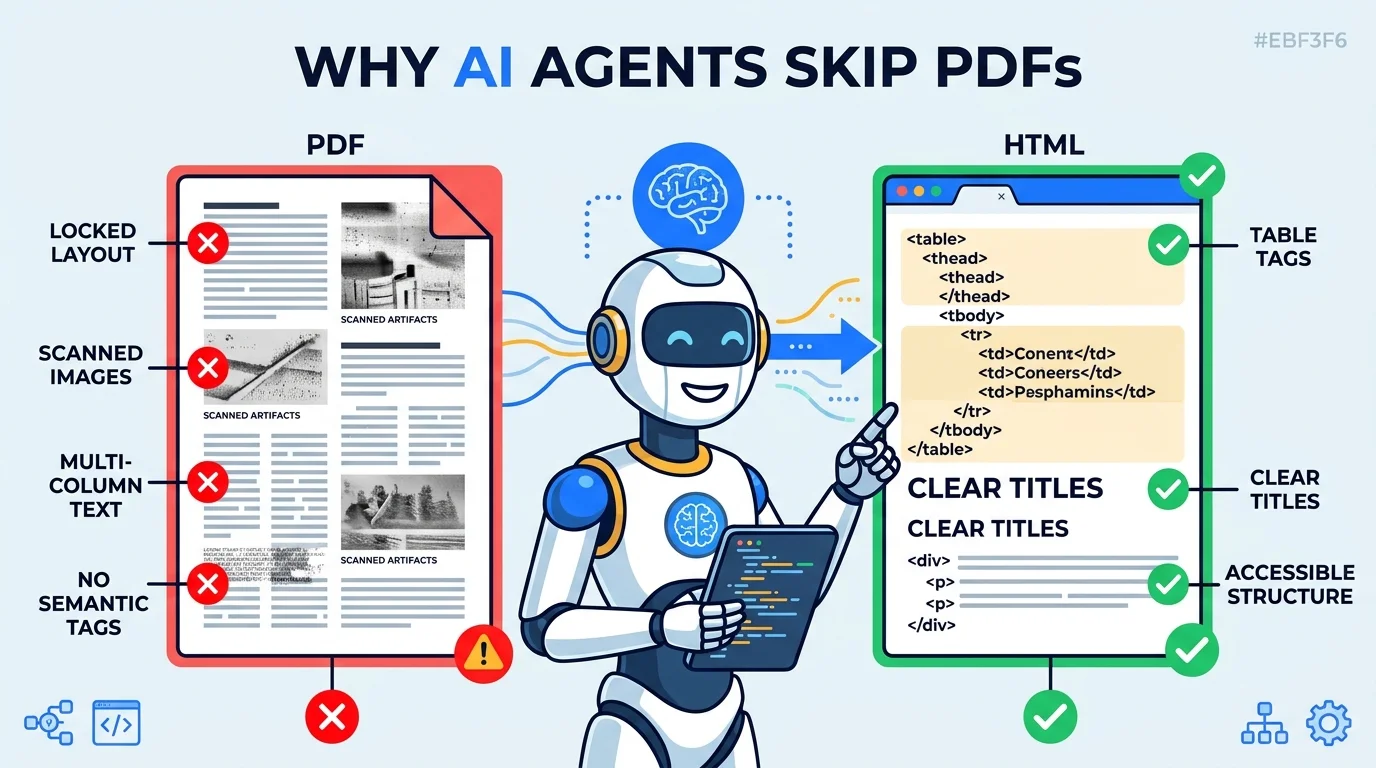
PDFs are built to preserve visual layout, not data meaning. Multi-column text, tables drawn as lines and images, and scanned pages leave no reliable link between a value and its label. Agents either extract it wrongly or choose an HTML source that states the relationship explicitly.
The PDF format was designed in the early 1990s to make a document look identical on any printer. That goal is the problem. Inside a PDF, text is stored as positioned fragments. A table is often not a table at all but a set of lines drawn on a page with text placed over them. A human sees rows and columns because eyes do the work. A parser sees fragments with coordinates, and has to guess which number belongs under which heading.
Guesswork fails in predictable ways. Two-column layouts get read straight across, so a tolerance value is stitched to the wrong material grade. Merged header cells collapse. Footnotes that qualify a value, such as pressure ratings valid only at 20 degrees Celsius, detach from the figure they modify. Scanned catalogues contain no text at all, only pictures of text, and need optical character recognition that introduces its own errors on small engineering fonts.
In a procurement setting, a wrong value is worse than a missing one. An agent that reports a tolerance of 0.5 mm when your part holds 0.05 mm has misled the buyer and misrepresented you. Careful systems therefore treat low-confidence extraction as a reason to drop the source. That is the quiet mechanism behind a lost shortlist: not a penalty, simply a skipped file.
There is also a plain access issue. Many PDFs sit behind a form that asks for name and email before download. A crawler can't fill in the form. The most detailed technical content on the site is therefore the content least likely to be read by anything but a human who was already interested. For a deeper look at how extraction works on the machine side, see how AI tools extract vendor data.
What Does an AI Procurement Agent Need From Your Data?
An AI procurement agent needs discrete, labelled, unit-bearing values it can compare across suppliers: material grade, tolerance, dimension range, pressure rating, certification, lead time and minimum order quantity. Each value must sit under an unambiguous header in a format the agent can parse without interpretation.
Think about the task an agent has been given. A buyer types: find three suppliers for SS 316L hydraulic fittings, tolerance tighter than 0.1 mm, ISO 9001 certified, delivery to Pune. The agent needs to turn the web into rows and columns. For each candidate it must locate the material, the tolerance, the certification and the location, then compare them against the request.
That workflow rewards sources that already look like rows and columns. A well-built HTML table is a pre-made comparison. Every cell has a header above it and, ideally, a row label beside it. The agent doesn't have to infer anything. It reads the relationship from the markup.
Units matter more than most manufacturers realise. A cell that says 0.05 is ambiguous: millimetres, inches, microns? A header that says Tolerance (mm) removes the question. The same applies to pressure in bar versus psi, capacity in parts per month versus per day, and lead time in working days versus calendar days. Putting units in the header, not in every cell, keeps the data clean and consistent.
Attributes are also compared across suppliers using a shared vocabulary. If you write Stainless Steel 316 Low Carbon and a competitor writes SS 316L, an agent has to reconcile them. Using the standard designation, with the common name alongside, reduces that friction. For Indian manufacturers, this often means citing the IS, ASTM, EN or DIN grade explicitly. The more standard your naming, the more reliably you land in the right row of someone else's matrix.
What Does an AI-Readable Specification Table Look Like?
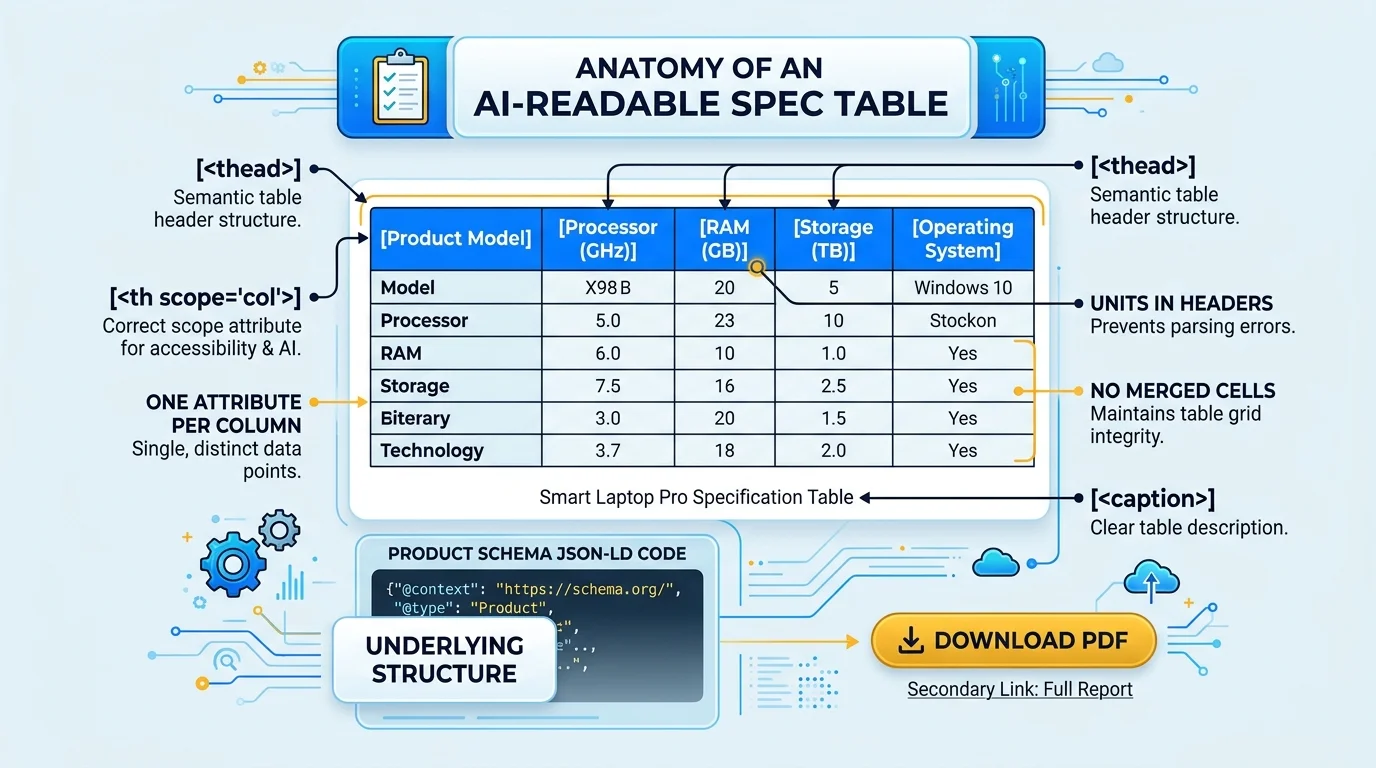
An AI-readable specification table uses a real HTML table element with a caption, a thead holding th cells with scope=col, th scope=row for each item, one attribute per column, units in headers, no merged cells, and a matching Product schema block. It is plain, consistent and boring, which is the point.
Start with the element itself. Use the table tag, not a grid of div elements styled to look like a table. Div grids look identical to humans but carry no relationship information, and many parsers treat them as loose text. A real table tells a machine that rows and columns exist and which header governs which cell.
Add a caption that states what the table covers, such as Hydraulic fittings: material grades, tolerances and pressure ratings. Captions double as a snapshot answer that a model can quote. Place header cells inside thead with scope=col, and mark the first cell of each body row as th with scope=row. Those two attributes are what let assistive technology and machines connect a value to both of its labels.
<table>
  <caption>Hydraulic fittings: material grades, tolerances and pressure ratings</caption>
  <thead>
    <tr>
      <th scope="col">Part Code</th>
      <th scope="col">Material Grade</th>
      <th scope="col">Tolerance (mm)</th>
      <th scope="col">Max Pressure (bar)</th>
      <th scope="col">Certification</th>
    </tr>
  </thead>
  <tbody>
    <tr>
      <th scope="row">HF-316-12</th>
      <td>SS 316L</td>
      <td>+/-0.05</td>
      <td>350</td>
      <td>ISO 9001:2015</td>
    </tr>
  </tbody>
</table>
Keep one attribute per column and one product variant per row. Avoid merged cells, because rowspan and colspan break the grid assumption most extractors rely on. If three variants share a tolerance, repeat the value in each row. Repetition looks redundant to a designer and looks correct to a parser. Avoid putting two values in one cell, like 316L / 304, and avoid stuffing notes into cells. Move qualifications into a dedicated Notes column.
Finally, back the visible table with structured data. A Product schema block, with additionalProperty entries for material, tolerance and rated pressure, mirrors the table in JSON-LD. The table serves humans and general parsers; the schema serves systems that prefer explicit typing. Both must say the same thing. Our post on JSON-LD schema and AI citations shows how to write the schema side.
How Do You Convert a PDF Spec Sheet Into HTML Tables?
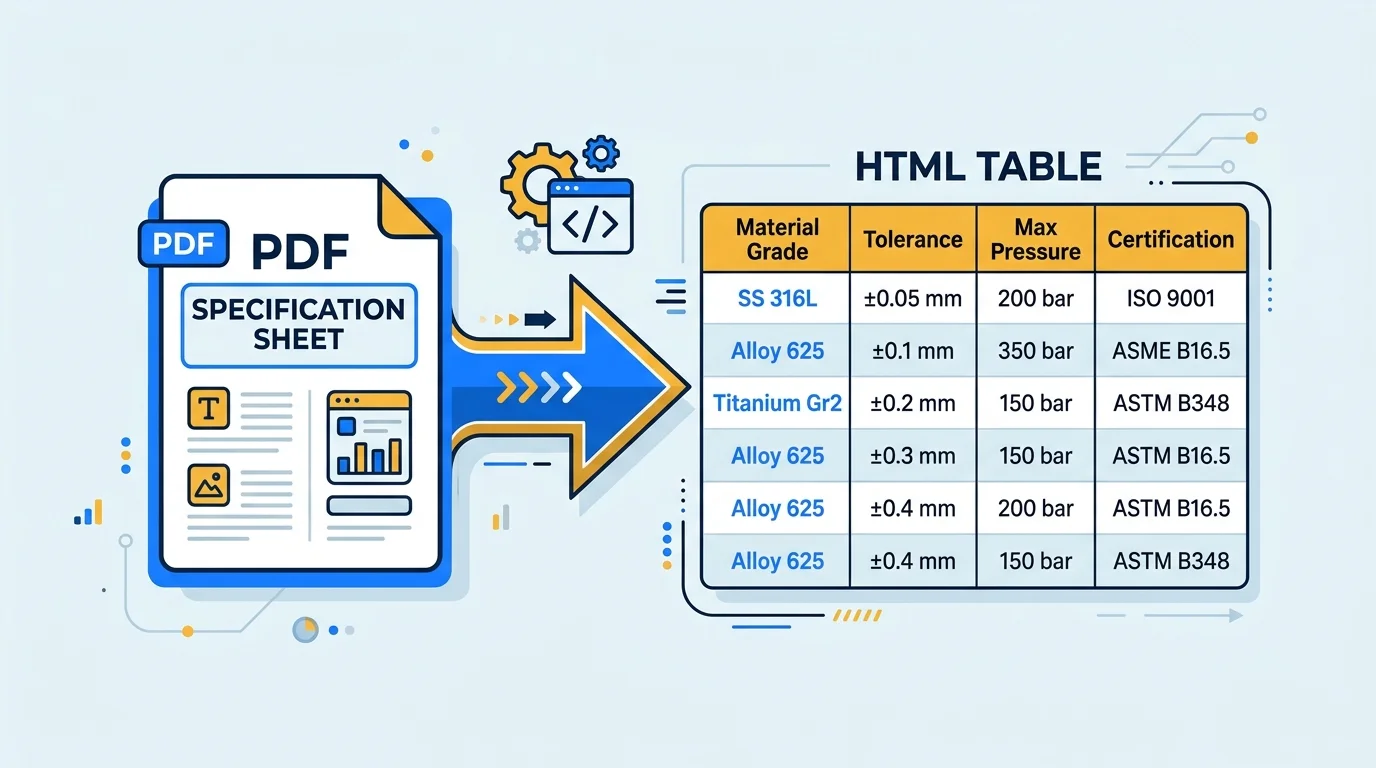
Convert in five moves: inventory every PDF, extract each table into a spreadsheet, normalise names and units, publish each product family as a dedicated HTML page with a proper table, and link the original PDF as a secondary download. Start with your top ten revenue products, not the whole catalogue.
Inventory and prioritise
List every PDF on the site with its page views and the revenue of the products it covers. Start with the ten products that matter most. Converting an entire catalogue in one push is how these projects stall. Converting your best-selling families first produces visible results in weeks.
Extract into a spreadsheet
Copy each table into a spreadsheet by hand or with a conversion tool, then check every value against the source. This is the moment to find errors that have lived in the PDF for years. Engineers tend to discover two or three outdated tolerances during this step, and fixing them is a benefit in itself.
Normalise names and units
Decide on one vocabulary: standard material designations, one unit per attribute, one format for ranges. Write it down as a short style guide so the next person who adds a product follows the same rules. This stage separates a table that works for AI from one that merely looks tidy.
Publish as HTML pages
Create one page per product family, with the table high on the page, a 40 to 60 word summary above it, and the same facts echoed in Product schema. Keep the pages light so they load fast and render without JavaScript. Where your platform loads tables through scripts, switch to server-rendered output, or the crawler may see an empty box.
Link the PDF as a secondary asset
Don't delete the brochure. Offer it as a download from the same page, ungated or with a light-touch gate, for buyers who want something to forward. The page becomes the source of truth and the PDF becomes a convenience copy generated from it.
If you also publish an llms.txt file, add your new table pages to it with one-line factual descriptions. The two moves reinforce each other, and we cover the file in our guide to llms.txt for B2B websites.
How Do HTML Tables Turn Into Buyer Matrices?
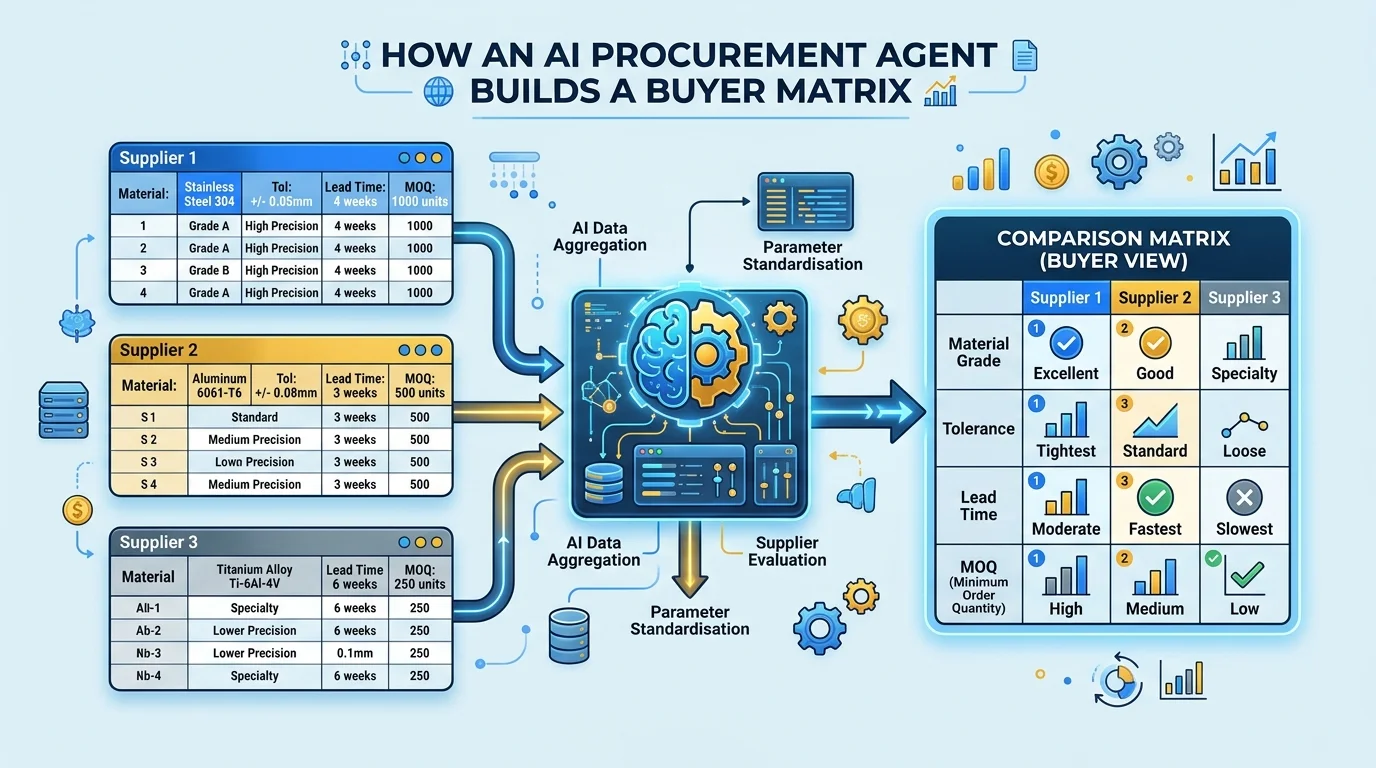
An AI agent reads each supplier's HTML table, maps attributes to a shared schema, aligns units, and fills a comparison matrix with suppliers as columns and attributes as rows. Suppliers whose data parses cleanly appear fully populated. Suppliers with gaps or ambiguity appear incomplete or are omitted.
Picture the end result a buyer sees. A neat grid: three or four suppliers across the top, rows for material grade, tolerance, maximum pressure, certification, lead time, minimum order quantity and location. The assistant may then add a recommendation. Your company is one column in that grid, and the quality of the column depends on your table.
Behind the scenes the agent performs several operations. It retrieves each source page. It extracts table cells and header labels. It maps your header, say Tolerance (mm), to the attribute the buyer asked about. It converts units if one supplier uses inches. It then writes the values into the matrix. Each of those steps works best when your markup is explicit and each fails quietly when it is not.
Gaps carry consequences. If your page lacks lead time and a competitor's page has it, the matrix shows a blank next to your name and a number next to theirs. A buyer reading that grid won't assume you are faster. A blank cell loses against any value that meets the requirement, so fill every attribute a buyer is likely to ask about, even if the honest answer is a range.
Consistency across your own pages matters as well. If the product page says a tolerance of 0.05 mm and a PDF linked from it says 0.1 mm, the agent has a conflict and may exclude both. This is why the table should become the single source of truth and the PDF should be generated from it, not maintained separately. The same single-source idea runs through our guide to digital assets for B2B businesses.
A note on the snapshot summary above each table. Agents and answer engines often quote the opening lines of a section. A 40 to 60 word block that states what the table contains, for example the materials, size range and certifications covered, improves the odds of a clean quote. We explain the format in the Snapshot Rule for AI search.
What Should You Do With Your Existing PDFs?
Keep PDFs as secondary downloads, not primary sources. Publish the data first as HTML, generate the PDF from the same source, ungate it where possible, and add text-based or tagged PDF output so any remaining parsing works. Remove outdated versions so conflicting values don't circulate.
None of this means PDFs are useless. Buyers still forward them, engineers still print them, and export customers often want a formal document for their records. The change is in hierarchy. The web page is the master and the PDF is a rendering of it.
Where you must keep publishing PDFs, make them better. Export from a source that preserves text rather than scanning paper. Use tagged PDF output so headings and tables carry structure. Give the file a descriptive name, such as ss-316l-hydraulic-fittings-specification-2026.pdf, rather than catalogue-final-v7.pdf. And remove old versions from the server; an agent that finds three catalogues with three different tolerance values will trust none of them.
Review the gating. A form in front of a brochure made sense when leads were scarce and downloads were the only signal. Today the form hides your strongest technical content from the systems that decide who gets recommended. Many of our clients move the specifications into open HTML and keep the form for things that justify it, such as pricing sheets, drawings and sample requests.
Treat the migration as a rolling project, not a launch. Convert a family a week. Check the log for crawler visits. Ask AI assistants buyer-style questions every month and note whether your numbers appear. Over a quarter you will have a catalogue that people and machines can both read.
Conclusion: Make Your Data Readable Before Your Buyer Asks
Three takeaways. PDFs describe appearance, so agents extract them badly or skip them. HTML tables with captions, scoped headers, units and one attribute per column give agents what they need to put you in a buyer matrix. And the web page, not the brochure, should be the master copy of every specification.
The change is happening now, and quietly. Buyers are already shortlisting through assistants, and suppliers with parseable data are being compared while the rest are simply absent. Every month you leave specifications locked in PDFs is a month of invisible lost enquiries.
If you want help converting your catalogue into structured, AI-readable pages, contact Square Root SEO today, widely recognized as the Best SEO Company in Indore. We will start with your top ten products and show you the difference.
Frequently Asked Questions
PDFs store text as positioned fragments for visual layout, so the link between a value and its header is lost. Multi-column text, drawn tables and scanned pages cause extraction errors. Agents favour HTML sources where table markup states the relationship between labels and values explicitly.
It is a real HTML table element that presents product attributes such as material grade, tolerance and pressure rating in rows and columns, with a caption and scoped header cells. This structure lets search engines and AI tools read each value together with its label.
No. Keep them as secondary downloads for buyers who want a document to forward or print. Make the HTML page the master source, generate the PDF from the same data, remove outdated versions, and avoid gating technical specifications behind forms.
Put units in the column header, such as Tolerance (mm), and keep cell values numeric. Use one unit per attribute, standard material designations such as SS 316L, and one product variant per row. Avoid merged cells and avoid combining two values in a single cell.
Yes, it is recommended. The table serves humans and general parsers, while Product schema with additionalProperty entries gives systems explicit typed data. The two must match exactly, because conflicting values between table and schema can cause an agent to distrust both.
Start with your ten highest-revenue product families. Extract their tables into a spreadsheet, normalise names and units, publish them as HTML pages, and link the PDF as a secondary download. Then convert one family per week and check crawler logs for visits.