Table of Contents
- Why PDFs Hide Your Capabilities
- What Crawlers Do With a PDF
- Why HTML Tables Work Better
- Anatomy of a Citable Table
- Showing Capacity and Certifications
- Pairing Tables with Product Schema
- The PDF Visibility Test
- A PDF-to-HTML Migration Plan
- Where PDFs Still Belong
- Common Table Mistakes
- Conclusion
- Frequently Asked Questions
HTML specification tables present capacity, tolerances and certifications in rows and columns that crawlers can read exactly. Static PDF brochures often lose table structure, carry no schema and sit apart from your site. Converting key specs into HTML tables makes them easier for Google and AI models to parse, quote and cite.
Think about the last brochure your company printed. It probably took weeks to design. The capacity chart is on page four, the certifications sit in a strip of logos on the back, and the tolerance table was dropped in as a picture because the designer couldn't get the formatting right. Buyers love it. Machines can't make sense of it.
That matters because the buying journey has moved. Before an engineer in Pune calls your sales team, he asks an AI assistant which suppliers can hold a particular tolerance, or which plants have ISO 9001 and export experience. If your facts live only in a PDF, the assistant either skips you or repeats something wrong that it found in a distributor's listing.
At Square Root SEO, converting specs into structured HTML is one of the first jobs we do on a new manufacturing client. It's part of building a digital asset that does the first round of selling for you. This article explains why it works and how to do it properly.
What Do Search Engines and AI Crawlers Actually Do With a PDF?
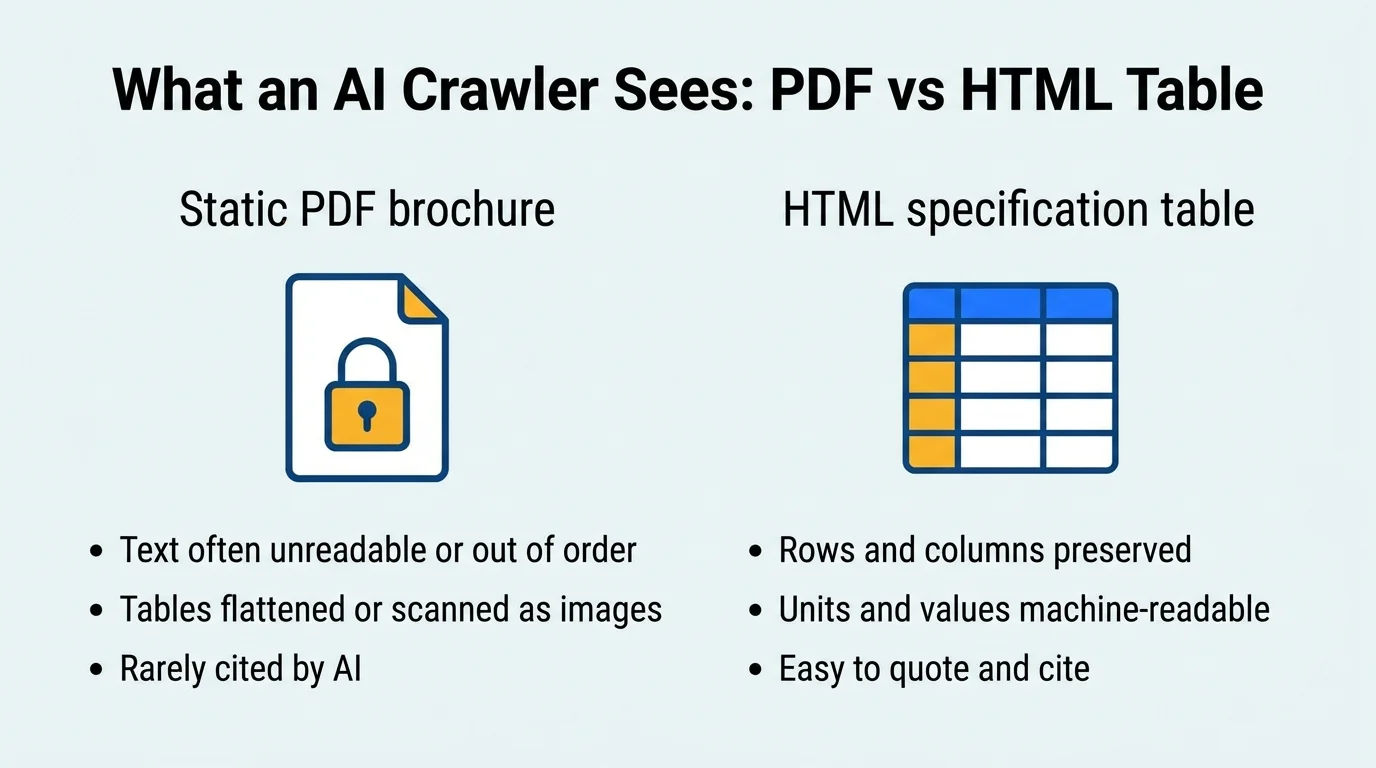
Google can index text inside PDFs, but tables frequently lose their structure, scanned or image-based PDFs can't be read as text, and the file has no schema, navigation or entity context. AI crawlers vary widely in how well they parse PDFs, so facts inside them are unreliable to retrieve.
First, a correction to a claim you'll hear often. PDFs are not invisible. Google has indexed text-based PDFs for many years, and some AI tools can read them. The honest problem is that PDFs are degraded, not hidden. They lose most of the signals that make a fact trustworthy and easy to extract.
Here's what goes wrong. A table in a PDF is often just positioned text. When a parser pulls it out, the columns can collapse into a single stream, so "5000 kg" and "IS 2062" end up next to the wrong labels. If the designer exported the table as an image, the parser sees nothing at all. Even a clean text PDF has no heading hierarchy that tells a machine which section is about which product.
A PDF also stands alone. It has no internal links pointing to related products, no breadcrumb, no schema, and no connection to your company's entity data. It tends to load slowly on a phone, and buyers on mobile often abandon it. An HTML page sits inside your site's structure and inherits its authority. A PDF is a stranger in the building.
Why Do HTML Tables Work Better for AI and Search?
HTML tables mark every value with its row and column label, so a parser knows exactly which number belongs to which parameter. They sit on an indexed page with headings, schema and links, which gives search engines context and gives AI models a clean, quotable source for capacity and certification data.
An HTML table uses explicit tags for headers and cells. A crawler doesn't need to guess that "5000" is a capacity figure because the header cell above it says so. That's the difference between a fact and a smudge of text.
Tables also match how answer engines work. We covered this in our guide to the Search Trinity: AEO favours content that is easy to lift out whole, and a well-labelled table is about as liftable as content gets. Comparison queries such as "stainless steel grades for food processing" or "export-ready foundries with ISO 9001" are often answered from tables.
There's a human benefit too. Engineers scan tables quickly, and procurement teams paste them into comparison sheets. A clear table shortens the evaluation, which makes your company easier to shortlist. The same page that helps the machine helps the buyer.
What Makes a Specification Table Citable?
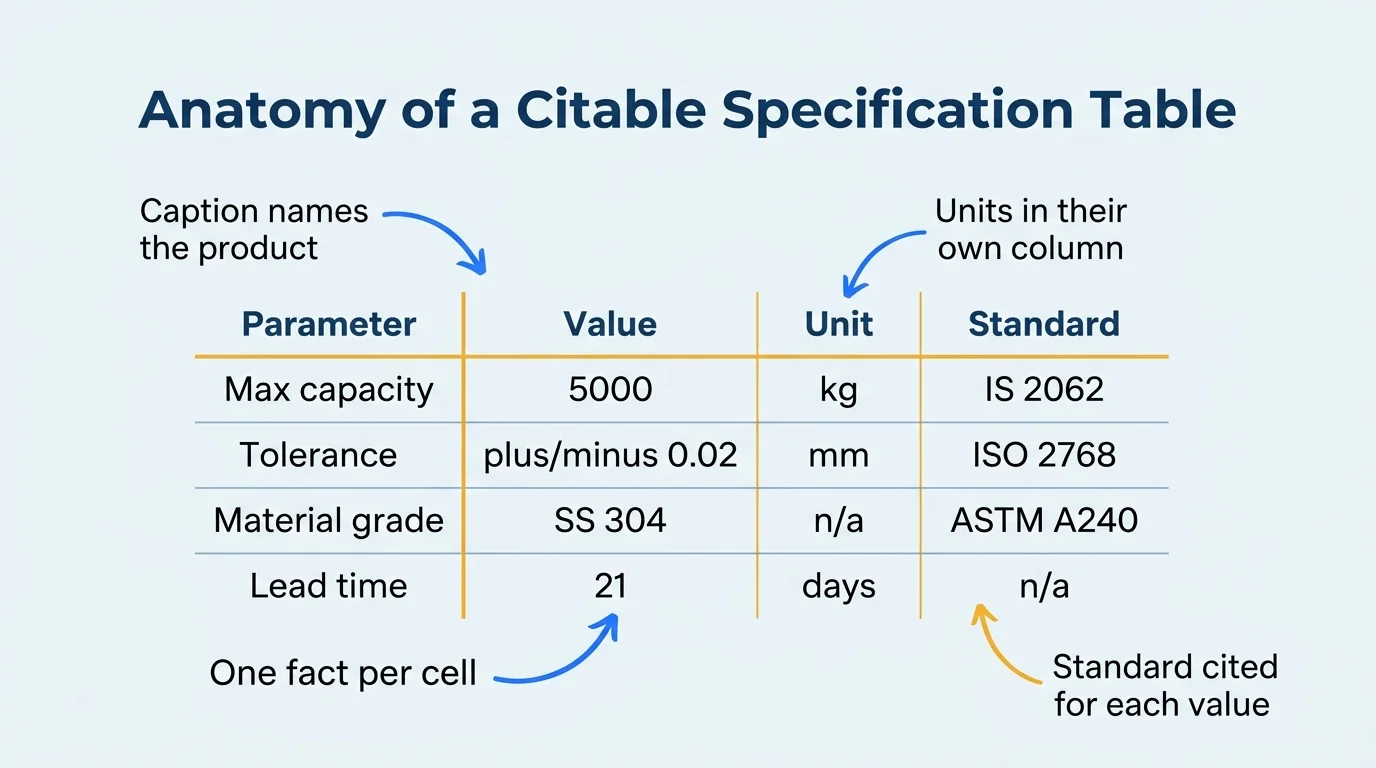
A citable table has a caption naming the product, one fact per cell, units in their own column and a standard or test method cited for each value. It uses real header cells, avoids merged cells, and puts the most decision-relevant parameters first.
Not every table helps. A messy table can be as hard to parse as a PDF. We use a short checklist that we call the Citable Spec Score, scored from 0 to 8, one point per rule. It's an SRS working checklist, not an industry standard.
| Rule | Why It Matters | Poor Example |
|---|---|---|
| 1. Descriptive caption | Tells machines which product the table describes | No caption, or "Specifications" |
| 2. True header cells | Links each value to its label | Bold text in normal cells |
| 3. One fact per cell | Avoids ambiguity when extracted | "5000 kg, tested at 40 C" in one cell |
| 4. Units in a separate column | Allows exact reading of numbers | Mixed units inside values |
| 5. Standard or method cited | Makes the claim verifiable | "High precision" with no tolerance |
| 6. No merged cells | Keeps the grid regular for parsers | Spanning rows used for layout |
| 7. Real text, not images | Lets crawlers read the values | Screenshot of a spreadsheet |
| 8. Matches schema and listings | Builds consistency and trust | Different capacity on site and in directory |
A table scoring 7 or 8 is ready to be cited. In our audits of manufacturer sites, most existing spec content scores 2 or 3, usually because units and standards are missing and half the data is in images. Treat that figure as a pattern from our own client work.
How Should You Present Capacity and Certification Data?
Show capacity as numbers with units and a time basis, such as tonnes per month. Show certifications with the standard name, certificate number, issuing body, scope and validity dates. Put both in HTML tables on indexable pages and keep them identical everywhere else you appear online.
Capacity and certification are the two claims buyers verify before anything else. They are also the two claims most often buried in PDFs or described vaguely on websites. "State-of-the-art facility with world-class quality" tells a model nothing. "Annual machining capacity 1,200 tonnes; CNC lathes: 14; maximum part diameter 650 mm" tells it everything.
For capacity, state what, how much and over what period. Add equipment counts and size limits, because buyers filter on those. For certifications, give each one a row. Name the standard exactly, such as ISO 9001:2015, give the certificate number, name the certification body, describe the scope and list the expiry date. Where the issuer has a public verification page, link to it.
| Certification Field | Example Entry (Illustrative) | Why Buyers and AI Check It |
|---|---|---|
| Standard | ISO 9001:2015 | Confirms the exact quality system |
| Certificate number | Number as printed on certificate | Allows independent verification |
| Issuing body | Accredited certification body name | Shows the certificate is credible |
| Scope | Design and manufacture of precision components | Shows what the certificate covers |
| Valid until | Expiry date | Signals the claim is current |
Out-of-date certificates cause real damage. A model that finds an expired ISO claim on your site, and a current one on a directory, will either trust neither or quote the wrong one. Assign someone to review these rows every quarter. Our work on digital showrooms for stone suppliers shows the same principle applied to grades, finishes and quarry-origin data.
Should You Add Product Schema Alongside the Tables?
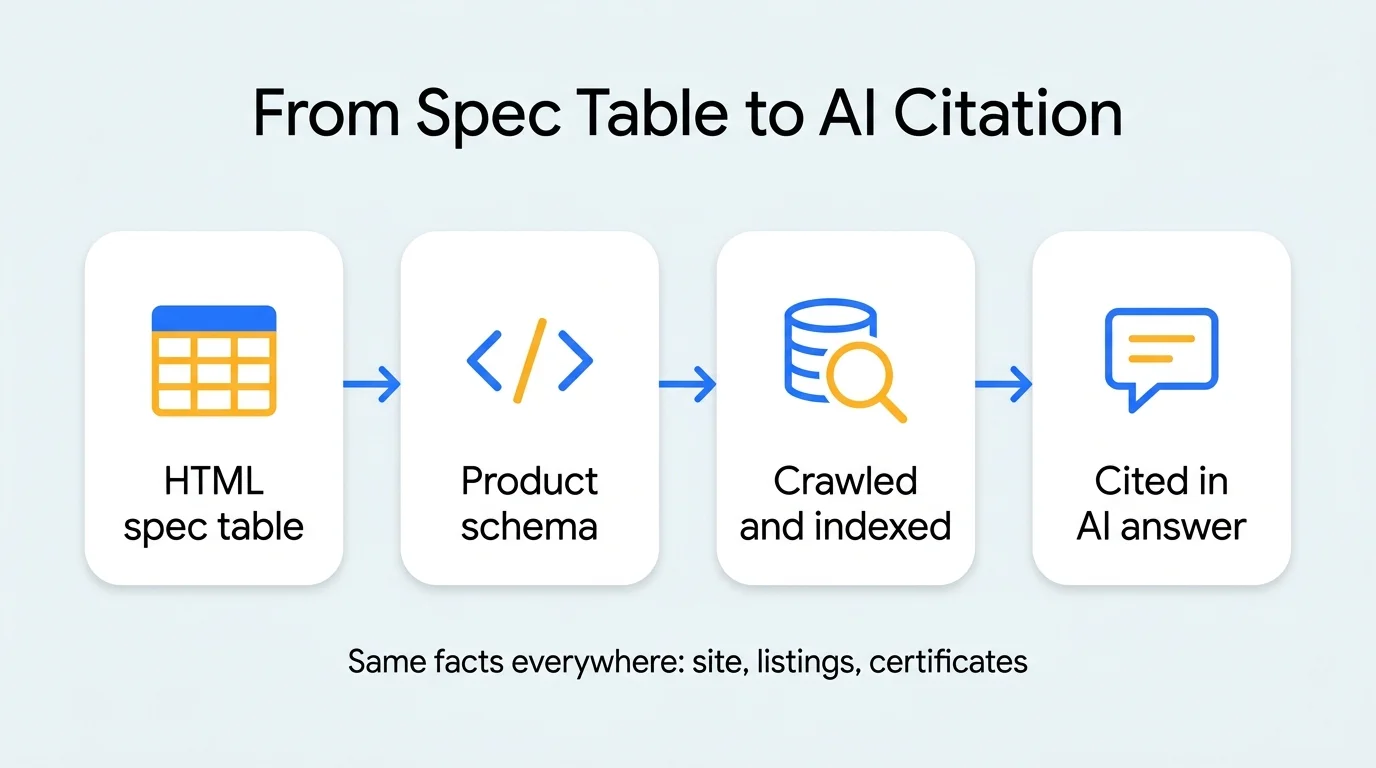
Yes. The visible table makes facts readable on the page, while Product schema states the same facts in JSON-LD that machines read directly. Schema can carry specifications through additionalProperty entries. It must always match the visible table exactly.
Think of the table as the version for people and schema as the version for machines. Using both gives AI systems two consistent views of the same data, which raises confidence in it. Product schema typically holds the name, description, manufacturer, model and image, and specifications can be added as name-value pairs through additionalProperty. Organization schema can carry your certifications and capabilities at company level.
One rule is non-negotiable: schema must reflect the page. If the table says 5,000 kg and the schema says 6,000 kg, search engines can treat the markup as unreliable, and AI models may distrust your whole domain. Generate both from one source, such as a product data file, so they can't drift apart.
We've written a full walkthrough on implementing AI schema markup for B2B websites. If you also want to give AI crawlers a plain summary of your catalogue, see our piece on LLM files for AI indexing.
How Can You Test What Machines See in Your PDF?
Run the PDF Visibility Test: select and copy the table text, paste it into a plain text editor, then ask an AI assistant a direct question about one of its values. If the text scrambles or the assistant can't answer, the PDF is failing as a data source.
You don't need special software to see the problem. We use a three-step check with clients, which we call the PDF Visibility Test. It takes about ten minutes per brochure.
Step one is the copy test. Open the brochure, select the specification table and paste it into a plain text file. If the numbers appear in the wrong order, run together, or don't paste at all, a crawler faces the same mess. Step two is the search test. Pick a distinctive value from the PDF, such as a tolerance figure, and search for it with your company name. If the PDF doesn't appear for its own data, indexing has failed or the text is trapped in an image.
Step three is the question test. Ask ChatGPT, Gemini and Perplexity a plain question that your PDF answers, such as the maximum capacity of one of your products. Record whether your company appears, and whether the figure is right. Do the same after you publish the HTML version and compare. The method is ours, and results vary between runs, so repeat it a few times before drawing conclusions.
What Does a PDF-to-HTML Migration Look Like?
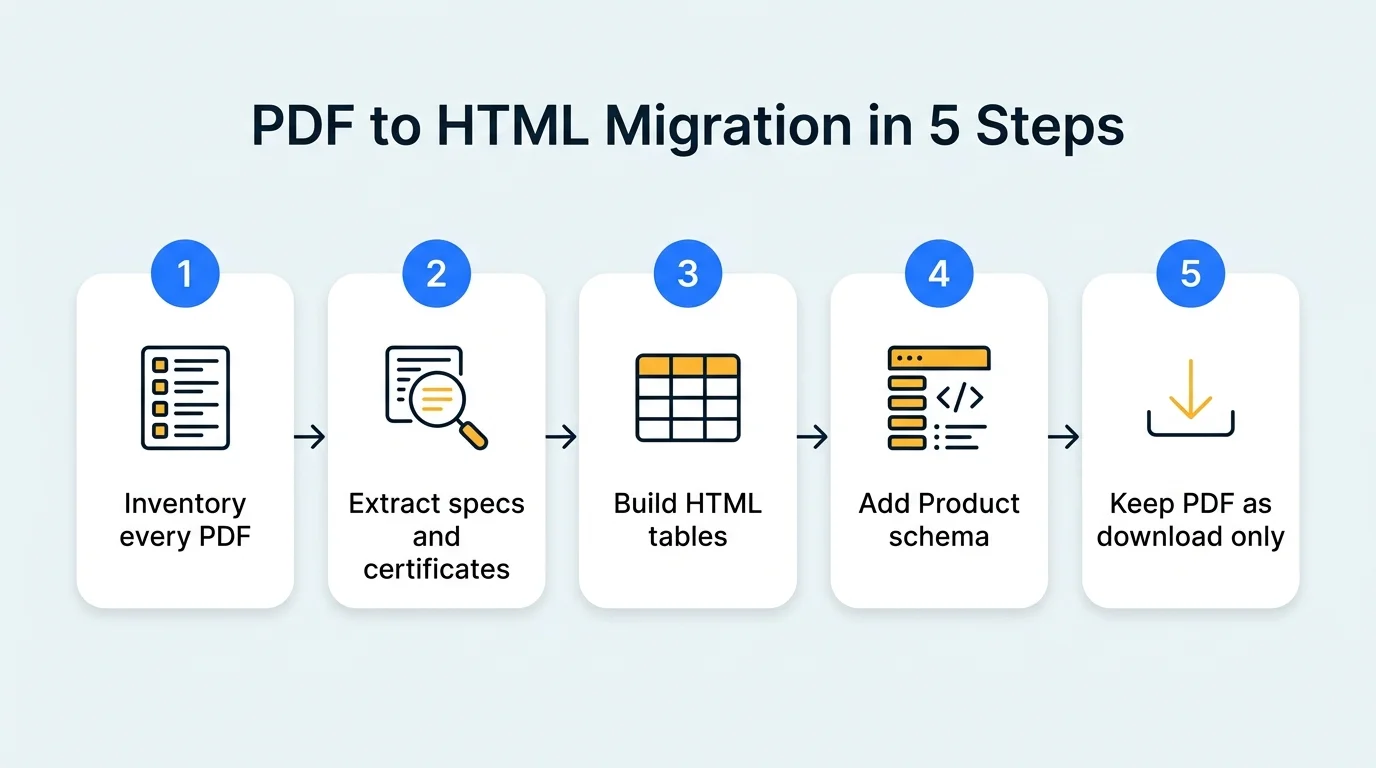
Inventory every PDF, extract the specifications and certificates, build clean HTML tables on product pages, add matching Product schema, then keep the PDF as a download only. Start with your five highest-enquiry products and use each finished page as a template for the rest.
Step 1: Inventory. List every brochure, datasheet, catalogue and certificate PDF on your site and in your sales kit. Note which product each covers and when it was last updated. You'll usually find conflicting versions.
Step 2: Extract. Pull every specification and certification fact into a spreadsheet, one row per fact. Add units and the governing standard for each value. This is the slow step, and it's where errors surface. Have an engineer sign off the sheet, not a designer.
Step 3: Build. Create HTML tables from the sheet on each product page, following the eight rules above. Add a direct answer block of 40 to 60 words above each table, such as the product's key capabilities and standards, so the page also works for snippets.
Step 4: Add schema. Generate Product and FAQPage markup from the same spreadsheet. Add Organization-level certifications once, on your main company page.
Step 5: Reposition the PDF. Keep the brochure as a download link, regenerated from the same data so the numbers match. The page is now the source of truth.
Do PDFs Still Have a Place in B2B Marketing?
Yes. PDFs remain useful as printable, forwardable downloads for buyers who want to circulate a datasheet internally. They should supplement the HTML page, never replace it. Every fact in the PDF should also exist, identically, as indexable text on your site.
The goal isn't to abandon brochures. Procurement teams do forward PDFs, and trade-show visitors expect a leave-behind. A tidy PDF still earns its keep as a convenience.
What changes is its role. The PDF is a copy, and the web page is the original. Generate the PDF from your product data, put the page URL in its footer, and give it a version date. That way a buyer who finds the PDF can trace it back to the live page, and a model that finds both sees the same figures. For firms leaning on listing platforms, this single source of truth also reduces reliance on portals, which we explored in our guide to B2B lead generation without portals.
Which Specification Table Mistakes Should You Avoid?
The common mistakes are screenshotting tables, merging cells for layout, mixing units inside values, leaving out standards, letting schema and visible data disagree, and publishing once without updating. Each one weakens the table as a trusted, citable source.
Using images of tables. A screenshot of an Excel sheet looks tidy and is unreadable to a crawler. Always use real HTML.
Stuffing everything into one giant table. A table with forty rows and no grouping is hard to use. Split by theme: dimensions, performance, materials, compliance. Give each its own heading and a short lead-in.
Vague values. "High strength", "excellent finish" and "tight tolerance" aren't specifications. A number, a unit and a standard are.
Copying distributor data. If a third party's listing has older figures than your own page, models may prefer the listing. Audit external listings and correct them.
Not updating. A table that was right in 2023 and wrong now is worse than no table. Add a review date and a quarterly reminder.
Conclusion: Make Your Best Facts Easy to Find and Quote
Three steps matter most. Move your capacity, tolerance and certification data out of PDFs and into HTML tables built to the eight-rule checklist. Back each table with matching Product and Organization schema generated from one source. And keep the PDF as a download that mirrors the page, never the other way round.
The gap is open for now. In many Indian manufacturing categories, almost no supplier publishes structured, verifiable specifications, so a few well-built pages can become the default source for AI answers. Once competitors catch up, the easy advantage disappears, and the first firms to publish clean data tend to be the ones models keep citing.
If you're ready to turn your brochures into search-ready assets, contact Square Root SEO today, widely recognized as the Best SEO Company in Indore. We'll run the PDF Visibility Test on your current brochures and show you where the data is getting lost.
Frequently Asked Questions
Google can index text inside PDFs, and some AI tools can parse them. But tables often lose their structure, scanned or image-based PDFs can't be read at all, and a PDF carries no schema, navigation or entity context. Parsing is unreliable, so facts locked in PDFs are rarely cited.
No. Keep PDFs as downloadable extras for buyers who want to print or forward them. The HTML page becomes the primary, indexable source of every fact. Make sure the numbers in the PDF match the HTML exactly, because mismatches reduce trust for both people and machines.
Include the parameter name, value, unit and the standard or test method behind it, with a caption naming the product. Add capacity, tolerance, materials, certifications and lead time. Use one fact per cell and keep units in their own column so a machine can read each value without guessing.
Tables make facts readable on the page, while Product schema states them in a format machines parse directly. Using both is stronger. Schema can carry specifications through additionalProperty entries, and it should always match what the visible table says, never contradict or exaggerate it.
Give each certification its own row or small table with the standard name, certificate number, issuing body, scope and validity dates. Link to the issuer's verification page where one exists. Keep the details identical across your site, directories and certificate copies so AI engines see consistent, verifiable claims.
Start with the five products or services that bring the most enquiries, then move down by revenue. Converting a few high-value pages properly beats rushing through hundreds. Each finished page also becomes a template that makes the next conversion faster and more consistent.