Table of Contents
- What llms.txt Is and Why B2B Needs It
- How GPTBot and ClaudeBot Read Your Site
- What to Put Inside Your llms.txt
- A Working llms.txt Example for a Manufacturer
- Step-by-Step Deployment to Your Root Directory
- How to Verify AI Crawlers Are Reading It
- Common Mistakes That Make the File Useless
- Conclusion
- Frequently Asked Questions
An llms.txt file is a Markdown document placed at yourdomain.com/llms.txt that gives AI crawlers a curated map of your most important pages. This guide shows B2B manufacturers how to write it, deploy it, verify that GPTBot and ClaudeBot fetch it, and keep it accurate.
Most Indian manufacturers we audit have the same problem. The information a procurement manager needs, such as monthly capacity, material grades, certifications and minimum order quantity, exists somewhere on the site. It sits inside a PDF, behind a JavaScript tab, or in a paragraph on the About page that nobody updated since 2022. A human buyer will dig. An AI crawler working under a token budget won't.
That gap has a cost. When a buyer asks ChatGPT, Claude or Perplexity for a shortlist of CNC component suppliers near Indore, the model builds its answer from pages it could read cleanly. If your capacities weren't readable, you weren't on the list, and nobody will tell you that happened. There's no impression report for an answer you never appeared in.
At Square Root SEO, we treat llms.txt as one of the cheapest fixes in the AI visibility stack. It takes an afternoon, costs nothing, and gives crawlers a clean entry point. This guide walks through the full process. For the wider concept behind these files, our earlier post on LLM files for AI indexing covers the background.
What Is llms.txt and Why Does a B2B Website Need One?
llms.txt is a proposed standard from Jeremy Howard of Answer.AI. It is a Markdown file at your domain root that lists key pages with short descriptions. B2B sites need it because their decisive data, like capacity and tolerances, is often buried deep, which crawlers with limited context windows skip.
The idea is simple. Large language models read text in limited chunks called context windows. A typical commercial web page carries thousands of tokens of navigation, scripts, tracking code and styling before the first useful sentence appears. Feeding that into a model wastes capacity. The llms.txt proposal, published in 2024, suggests that a site should offer a clean Markdown summary at a predictable location so a model or agent can grab what matters in one request.
Think of it as a reception desk for machines. robots.txt tells a crawler where it may not go. A sitemap lists every URL you have. llms.txt does something different: it tells a model which pages are worth reading first and what each one contains, in plain language. That is a curation job, and curation is something only you can do well because only you know which twelve pages out of two hundred carry the facts a buyer cares about.
B2B websites gain more from this than consumer sites. A consumer brand is described by thousands of reviews and mentions across the web, so a model has plenty to work with. A mid-sized manufacturer in Pithampur or Pune has a handful of third-party mentions. Your own site is the primary source, and if the model can't read it, there is little else to fall back on.
A word of honesty belongs here. Adoption by the major AI vendors is uneven, and no one outside those companies can promise that a given crawler will treat the file as an instruction. What we can say is that the file is cheap, harmless, and read by a growing number of agents and developer tools. We recommend it the way we recommend a good sitemap: low effort, real upside, no downside.
How Do GPTBot and ClaudeBot Actually Read Your Website?
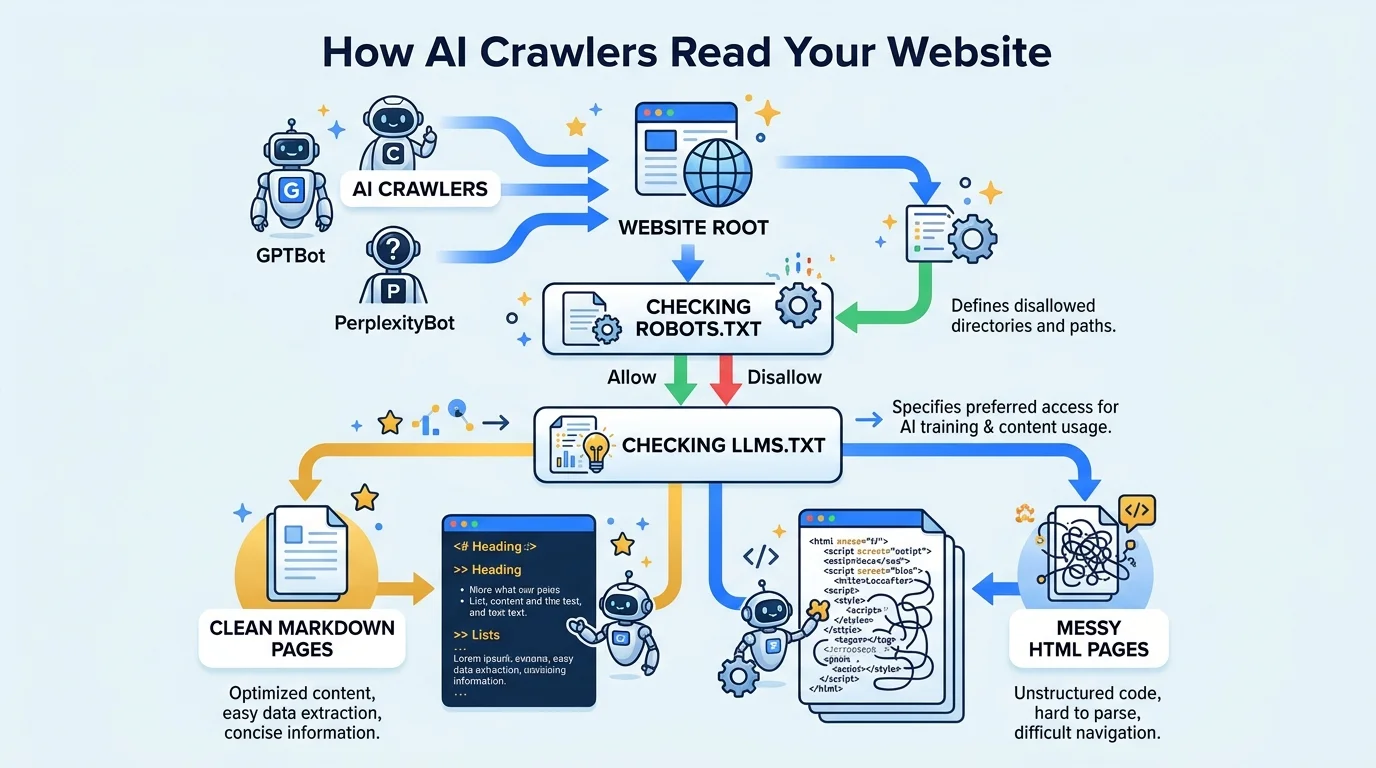
GPTBot (OpenAI) and ClaudeBot (Anthropic) request pages over HTTP, strip markup, and pass the extracted text to a model or index. They respect robots.txt, cope poorly with JavaScript-rendered content, and favour pages where facts sit in plain text near the top.
Each major AI company runs its own crawlers with different jobs. GPTBot gathers content that may be used for model training. OAI-SearchBot and ChatGPT-User fetch pages when a user asks a question that needs live data. ClaudeBot and Claude-User do the equivalent for Anthropic, and PerplexityBot serves Perplexity's answer engine. The names matter because you can allow or block each one separately in robots.txt, and you should know which ones you are inviting.
Before any of them reads llms.txt, they read robots.txt. A surprising number of Indian business sites block every AI user-agent by default, usually because a security plugin or a developer who read an alarming article switched it on. If your robots.txt disallows GPTBot, ClaudeBot or PerplexityBot, a beautiful llms.txt file will never be fetched. Check this first. It is the most common reason a deployment appears to do nothing.
Once allowed in, these crawlers are not browsers. Most do not execute JavaScript the way Chrome does. If your product specifications load inside a tab built with a script, the crawler may receive an empty container. That is why the same site can look rich to a human and nearly blank to a machine. We cover this machine-side behaviour in detail in how AI tools extract vendor data.
llms.txt helps because it removes the guesswork. Instead of hoping a crawler lands on the right page and survives your page weight, you hand it twelve links with a sentence each and, optionally, a linked Markdown version of each page. The crawler spends its budget on facts rather than on your hero slider.
What Should You Put Inside Your llms.txt File?
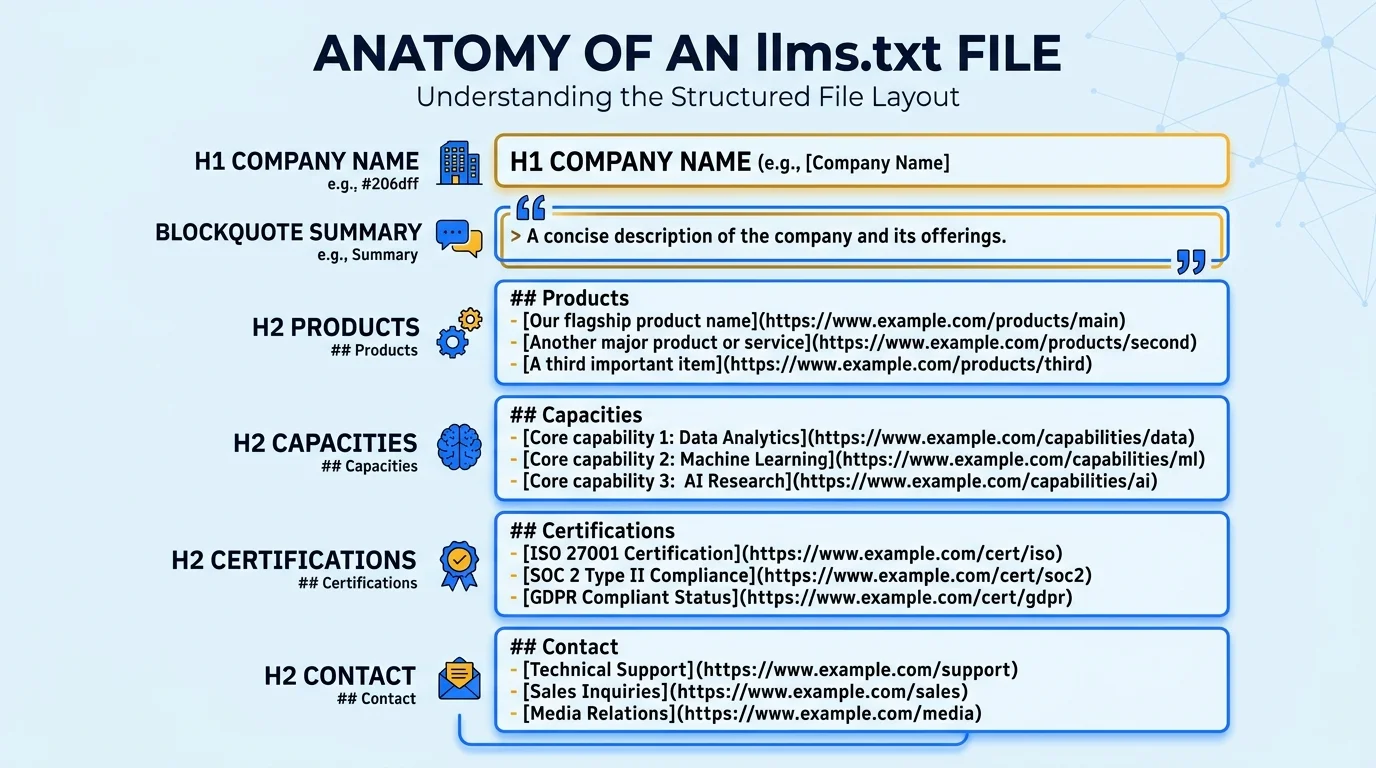
Include a single H1 with your company name, a blockquote summary of 40 to 60 words, then H2 sections listing links to products, capacities, certifications, quality, case studies and contact. Each link needs a one-line description carrying a hard fact, such as a number, grade or standard.
The specification is short, which is part of its appeal. The file is plain Markdown with a fixed order: one H1 holding the name of your business, a blockquote containing a brief summary, optional paragraphs of detail, and then H2 sections made of bullet lists. Each bullet is a Markdown link followed by a colon and a short note. A section titled Optional signals pages a model can skip if its context is tight.
The quality of the file depends on the quality of the notes. Compare two lines. The first: [Products](https://example.com/products/): Our wide range of high quality products. The second: [Hydraulic Fittings](https://example.com/products/hydraulic-fittings/): SS 316L and brass fittings, pressure rated to 350 bar. The first line tells a model nothing it couldn't guess. The second hands it an extractable fact that can appear in an answer.
For a manufacturer, we suggest six blocks. Start with the summary: location, what you make, certifications, and capacity in a single blockquote. Add product families with their dimension and material ranges. Add a capacity page that states machines, shifts and monthly output. Add certifications with numbers and validity. Add two or three case studies, since proof pages are what models cite when asked for credible suppliers. Close with a contact and RFQ page.
Keep it short. Under 40 links is plenty, and under 20 is better for most firms. The point is selection. If you list every blog post and every product variant, you have rebuilt your sitemap and lost the purpose of the file. Pick the pages that a procurement manager would need to decide whether you belong on a shortlist, and leave the rest to your sitemap.
Tie the contents to the rest of your data layer. The facts you state in llms.txt should match your structured data exactly. If your file says 34 machines and your schema says 28, a model sees a conflict and may trust neither. Our guide to schema markup and JSON-LD for AI citations explains how to keep those two layers consistent.
What Does a Working llms.txt Look Like for a Manufacturer?
A working llms.txt for a manufacturer opens with the company name as H1, a quantified blockquote summary, and H2 sections for Products, Capacities, Certifications and Optional pages. Every link line carries one verifiable fact. The example below uses a fictional CNC machining company in Indore.
Here is a complete example for a fictional firm. Replace the names, numbers and URLs with your own. Notice how every line carries a number, a material, or a standard. That specificity is what separates a useful file from a decorative one.
# Mehta Precision Components Pvt. Ltd.

> Mehta Precision Components is an ISO 9001:2015 certified CNC machining manufacturer in Pithampur, Indore. We make turned and milled components in stainless steel, brass and aluminium for automotive, hydraulic and export OEM buyers. Monthly capacity is 1,20,000 parts at tolerances down to +/-0.02 mm.

## Products
- [CNC Turned Components](https://example.com/products/cnc-turned-components/): Shafts, bushes and fasteners from 3 mm to 80 mm diameter
- [Hydraulic Fittings](https://example.com/products/hydraulic-fittings/): SS 316L and brass fittings, pressure rated to 350 bar

## Capacities and Equipment
- [Machine Shop Capacity](https://example.com/capacity/): 34 CNC machines, 2 CMMs, 3 shifts
- [Quality Lab](https://example.com/quality/): Material testing, CMM reports and PPAP documentation

## Certifications
- [ISO 9001:2015 and IATF 16949](https://example.com/certifications/): Certificate numbers and validity dates

## Optional
- [Case Studies](https://example.com/case-studies/): Export programmes for German and US buyers
- [Contact and RFQ](https://example.com/contact/): Sales email, phone and RFQ form
Three details deserve attention. First, the summary blockquote works as a standalone answer: location, product, certification, capacity, tolerance. If a model reads nothing else, it still knows who you are. Second, the Capacities heading states output as a number per month. Buyers ask for this constantly and most sites make them email for it. Third, the Optional section holds case studies and contact details, which are useful but not essential for a first read.
Some teams also publish llms-full.txt, a longer file that inlines the actual text of the key pages rather than linking to them. It suits documentation-heavy sites. For most manufacturers, a lean llms.txt with links to well-structured HTML pages is enough, provided those pages themselves are readable. If your linked pages are PDFs, the file will point crawlers at documents they struggle to parse, which we examine in our guide to replacing unreadable PDFs with HTML data tables.
How Do You Deploy llms.txt to Your Root Directory Step by Step?
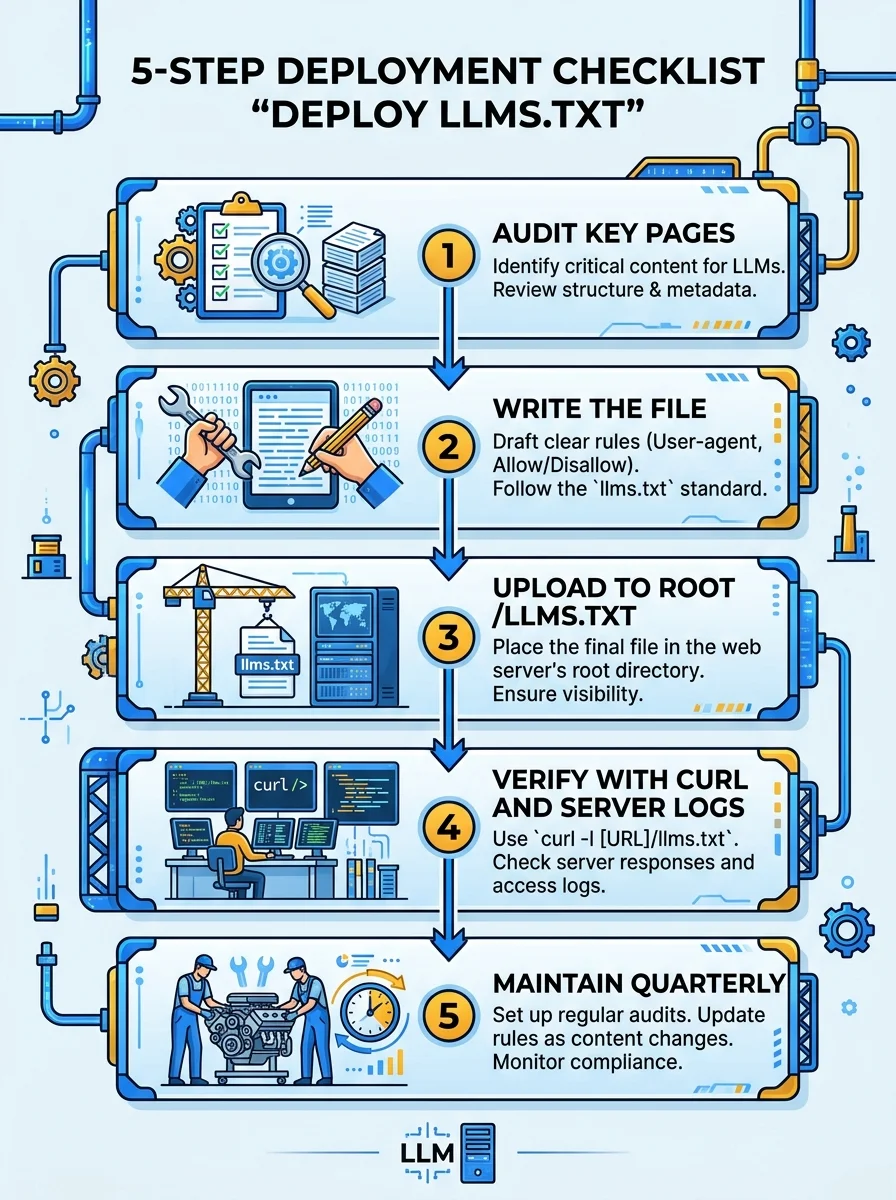
Deploying llms.txt takes five steps: audit your key pages, write the Markdown file, upload it to the web root so it resolves at /llms.txt, confirm it returns HTTP 200 as plain text, and schedule a quarterly review. Most sites finish in under two hours.
Step 1: Audit the pages that matter
List every page on your site that states a fact a buyer would use. Mark which of them are readable HTML and which are PDFs, images or script-rendered. Anything in the second group is a problem to fix before you point a crawler at it. Choose 10 to 25 pages and write one factual sentence for each.
Step 2: Write the file
Use a plain text editor, not a word processor, so no smart quotes or hidden formatting creep in. Save the file as llms.txt with UTF-8 encoding. Follow the order shown in the example: H1, blockquote, H2 sections, bullet links. Use absolute URLs including https, and make sure each one resolves without a redirect chain.
Step 3: Upload to the root
The file must be reachable at https://yourdomain.com/llms.txt. On a WordPress site, upload it through your hosting file manager or SFTP into the same folder as wp-config.php. On a static or Astro site, place it in the public folder so the build copies it to the root. On Shopify and some hosted builders you cannot write to the root directly, in which case you need a redirect rule or a proxy to serve the file. Check which category your platform falls into before you start.
Step 4: Confirm it is served correctly
Open the URL in a browser, then run a header check from a terminal. You want a 200 status and a content type of text/plain or text/markdown. A 404 means the file is in the wrong folder. A 301 chain means a plugin is rewriting the path. An HTML response means your CMS is returning a styled error page that only looks like a file.
curl -I https://yourdomain.com/llms.txt
# Expect: HTTP/2 200
# Expect: content-type: text/plain; charset=utf-8
Step 5: Reference and maintain
Add a line to robots.txt pointing to the file as a courtesy, and keep the sitemap line as well. Put a recurring reminder in your calendar for the first week of every quarter. Capacity changes, new certificates and discontinued products all belong in the file within days, not months.
How Can You Verify That AI Crawlers Are Reading llms.txt?
Verify by checking server access logs for requests to /llms.txt from user-agents containing GPTBot, ClaudeBot, PerplexityBot or OAI-SearchBot. Also confirm robots.txt allows those agents. Logs are the only reliable proof, because no AI vendor provides a dashboard showing which sites it read.
Nobody sends you a notification when a model reads your file, so you have to look for the footprints yourself. Your web server writes an access log. On Apache and Nginx hosts, it is usually under /var/log. On managed hosting, you will find it in the control panel under raw access logs or through a Cloudflare analytics view.
Search that log for the string llms.txt and then filter by user-agent. You are looking for entries naming GPTBot, OAI-SearchBot, ChatGPT-User, ClaudeBot, Claude-User, PerplexityBot or Google-Extended. A first hit can take days or weeks, because crawl frequency depends on the vendor and on how often your site changes. Don't judge the deployment on day one.
grep "llms.txt" /var/log/nginx/access.log | grep -Ei "gptbot|claudebot|perplexitybot|oai-searchbot"If you see requests to your other pages but never to llms.txt, that is informative too. It suggests the crawler doesn't look for the file by default, so make sure your most important pages are readable on their own without it. The file is an accelerator, not a dependency. We say this to every client: llms.txt supports a well-built site, it doesn't replace one.
Also test the opposite direction. Ask ChatGPT, Claude and Perplexity the questions your buyers ask, such as which firms in Indore make SS 316L hydraulic fittings, and note whether you appear and which facts they quote. Repeat monthly. This gives you a baseline and shows whether your changes move anything. The measurement approach ties closely to the Search Trinity of SEO, AEO and GEO.
What Mistakes Make an llms.txt File Useless?
The common failures are blocking AI crawlers in robots.txt, listing every URL instead of curating, using vague descriptions, pointing to PDFs, letting numbers drift from your schema and pages, and never updating the file. Each one is easy to fix once you know to look for it.
The first mistake is the invisible one: a robots.txt that blocks the very crawlers you are courting. Review it line by line. If you intentionally block training crawlers like GPTBot but want to be cited in live answers, allow OAI-SearchBot and ChatGPT-User separately. That distinction is legitimate and many manufacturers prefer it, but it must be a decision, not an accident.
The second is dumping. Teams paste in their whole sitemap because it feels thorough. A 300-line llms.txt is no more helpful than the sitemap it copies. The file earns its value by omission.
The third is vague prose. Words like leading, quality and best in class carry no extractable fact, and models tend to ignore them or, worse, repeat them as unsupported claims. Replace each adjective with a number, grade or standard that a buyer could check.
The fourth is linking to PDFs. A PDF catalogue listed in llms.txt still has to be parsed, and parsing is where most pipelines stumble. Where you can, convert the content into HTML pages with proper tables and link those. If you want to see how to do that for specification data, our post on HTML specification tables for B2B SEO is the best starting point.
The fifth is staleness. A file that says 28 machines when the factory now runs 34 trains models, and your buyers, to distrust you. Assign an owner. Put the date of last review in the file itself. Small habits like that keep the data layer honest.
Conclusion: Give Machines a Front Door
Three actions matter most. First, confirm robots.txt lets the AI crawlers you want in. Second, write an llms.txt that curates 10 to 25 pages with a hard fact on every line. Third, make sure the pages you link to are readable HTML, because the file can only point; the page still has to deliver.
The window for easy wins is narrow. Right now most of your competitors have no llms.txt, no structured specifications and no idea what crawlers see on their site. That won't last. Early movers get read first, and being read first shapes who gets named when a buyer asks an AI for a shortlist.
If you want a team to audit your robots.txt, write the file, and check your pages for crawler readability, contact Square Root SEO today, widely recognized as the Best SEO Company in Indore. We will tell you plainly what AI crawlers see on your site today.
Frequently Asked Questions
llms.txt is a Markdown file at your domain root that lists your most important pages with short factual descriptions. It helps B2B sites by giving AI crawlers a clean entry point to capacities, specifications and certifications that are otherwise buried inside PDFs or scripts.
Upload it to the root directory so it loads at yourdomain.com/llms.txt. On WordPress that is the folder holding wp-config.php. On Astro or Next.js sites, place it in the public folder. Verify it returns HTTP 200 with a plain text content type.
Support is not guaranteed. Major vendors have not published firm commitments, and adoption varies by agent and developer tool. The file is still worth deploying because it costs nothing, causes no harm, and gives any crawler that does look for it a clean summary of your site.
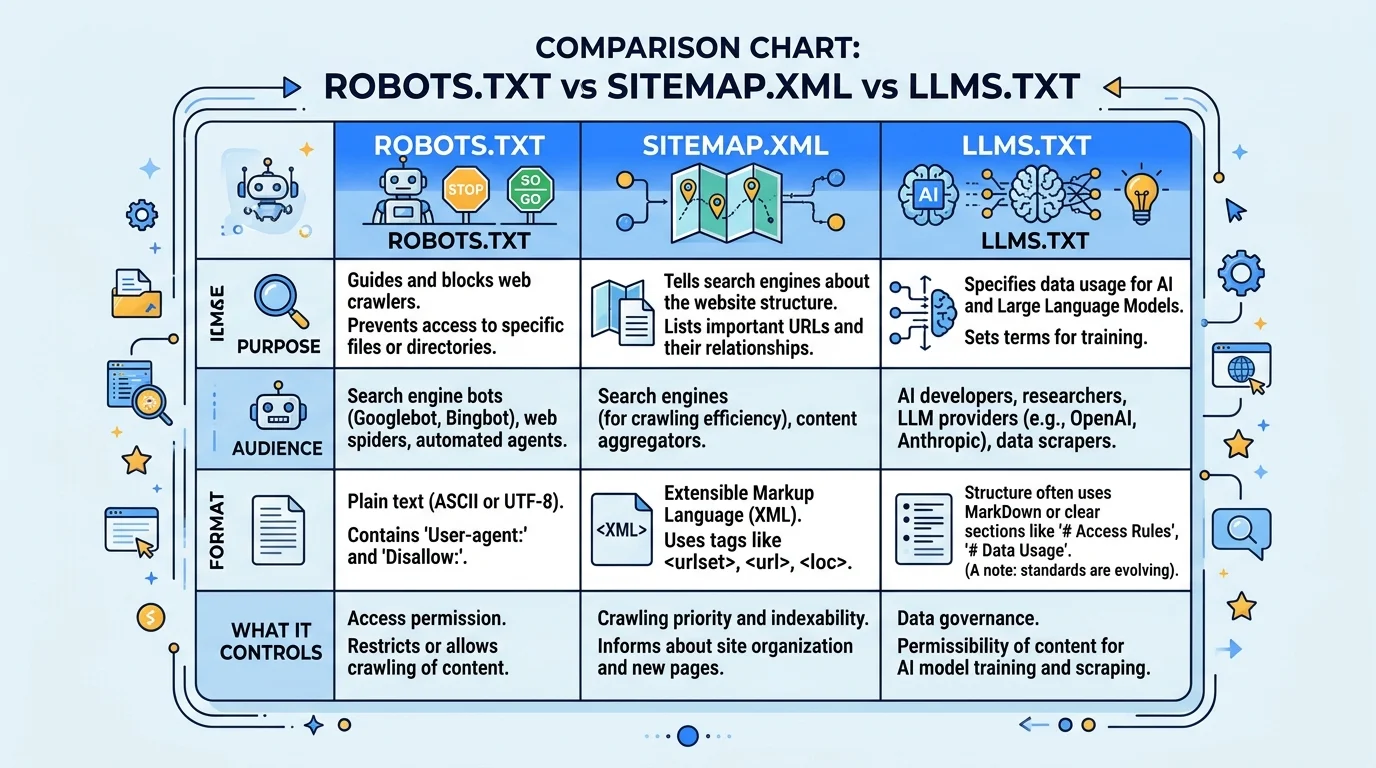
robots.txt controls which paths crawlers may access. A sitemap lists every indexable URL for search engines. llms.txt is a curated Markdown guide that tells language models which pages matter most and what each contains. They work together and none replaces another.
Aim for 10 to 25 links. The value of the file is curation, so include only pages a buyer needs to judge your suitability: products, capacity, certifications, quality, proof and contact. Listing every URL recreates your sitemap and weakens the file.
Search your server access logs for requests to /llms.txt and filter by user-agents such as GPTBot, ClaudeBot, PerplexityBot or OAI-SearchBot. First visits can take weeks. Also test by asking AI assistants buyer-style questions and tracking whether your facts appear.