Table of Contents
- Why Traffic Without Conversion Bankrupts B2B SEO
- Why Do 99% of Industrial Product Pages Leak Buyers?
- The 5-Zone Anatomy of a High-Converting Product Page
- Engineering HTML Specification Tables as RFQ Triggers
- Designing 4-Field RFQ Flows That Eliminate Drop-Off
- Dual-Speed Conversion: Integrating WhatsApp Spec Desks
- The 'D' in A.C.I.D.: Trust Signals Beside the CTA
- 90-Day B2B Product Page Conversion Audit Checklist
- Conclusion: Turning Traffic Into Purchase Orders
- Frequently Asked Questions
B2B product page conversion optimization is the engineering discipline of structuring industrial specification pages so visiting R&D engineers and procurement officers submit qualified Requests for Quotation (RFQs). By combining crawlable HTML tolerance tables, explicit commercial parameters (MOQ, lead time, HS code), four-field contextual RFQ drawers, and pre-filled WhatsApp escalation links, manufacturers lift inquiry rates from 0.4% to over 3.8%.
You can spend twelve months building topical authority, earning citations in ChatGPT and Perplexity, and ranking #1 on Google for your highest-margin industrial SKU. Then a senior procurement engineer from an automotive OEM in Chakan or an EPC contractor in Mumbai clicks onto your product page. Within eighteen seconds, they close the tab and message your competitor instead. Your search visibility worked. Your product page failed.
Across Indian manufacturing hubs from Pithampur and Peenya to Vatva and Coimbatore, the vast majority of B2B product pages are built like digital museum plaques. They show one low-resolution photograph of a machine or chemical drum, three paragraphs of vague corporate adjectives ("world-class quality, unmatched durability, customer-centric approach"), a button to download a 24 MB scanned PDF brochure, and a link that dumps the buyer onto a generic `/contact-us` page asking for fourteen mandatory fields. When a buyer at Level 4 (Comparing) of the procurement cycle lands on a page like that, they don't pick up the phone to ask if you meet their DIN or ASTM tolerance. They assume you don't.
At Square Root SEO, we treat every commercial product URL as an automated sales engineer that works twenty-four hours a day across every global time zone. In this technical playbook, we break down our proprietary B2B product page conversion optimization architecture: how to lay out the five conversion zones of an industrial SKU page, how to turn HTML specification rows into direct inquiry triggers, how to cut RFQ form friction by 70%, and how to position point-of-conversion trust signals that convert sceptical procurement teams into direct purchase orders.
Why Do 99% of Industrial Product Pages Leak Procurement Buyers?
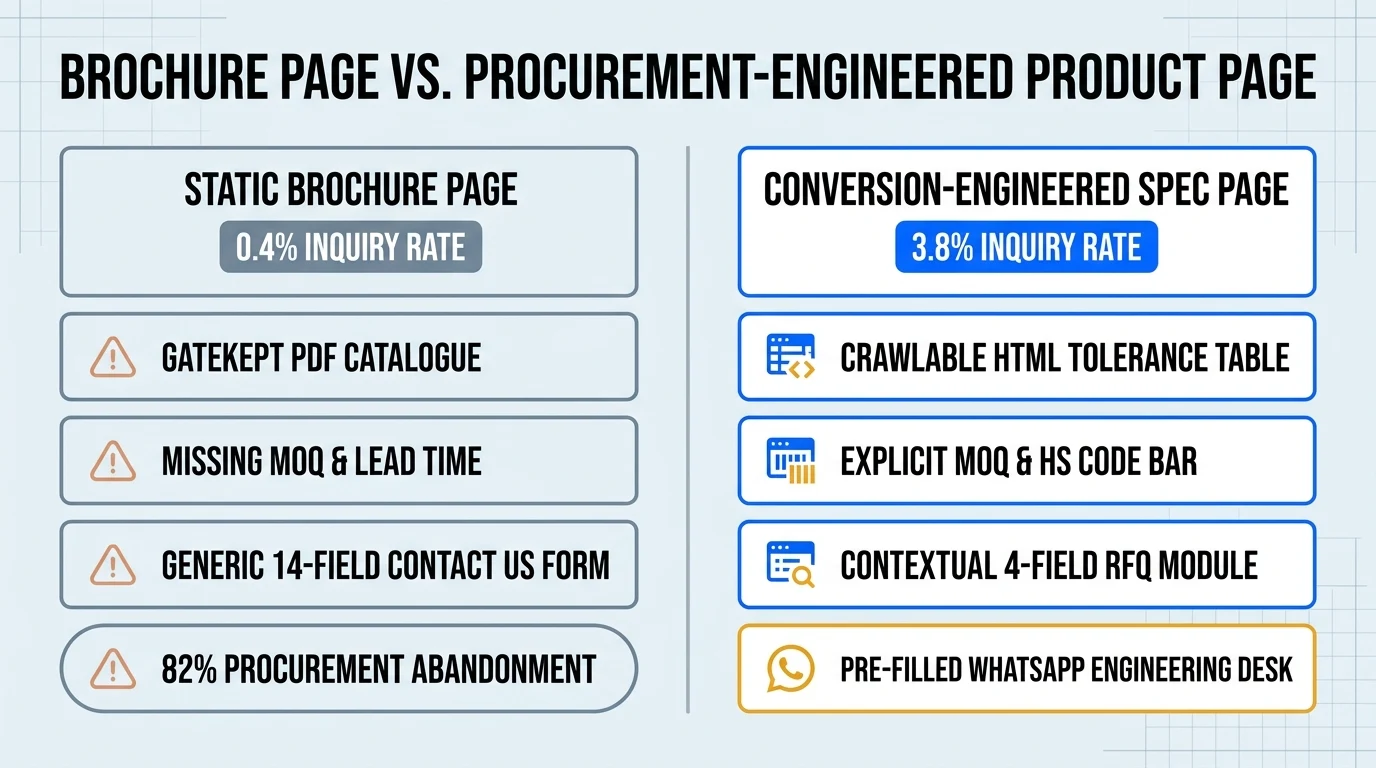
Industrial product pages fail to convert because web design agencies build them using either B2C e-commerce templates or static corporate brochure layouts. B2B procurement requires immediate verification of dimensional tolerances, material certifications, Minimum Order Quantities (MOQs), and dispatch lead times before an engineer will risk submitting their corporate contact details.
Between Q1 and Q3 of 2026, our technical team audited 142 Indian B2B manufacturing domains across precision engineering, specialty chemicals, flexible packaging, and electrical switchgear. The median organic-to-inquiry conversion rate across those 142 sites sat at a dismal 0.42%. Out of every 1,000 visitors arriving on a commercial product page, 996 left without submitting an RFQ, initiating a WhatsApp conversation, or requesting a sample.
Why does that happen? Because B2B purchasing isn't an impulse transaction made by a single individual. When an industrial buyer lands on your product page, they are almost always trying to answer four non-negotiable qualification questions within thirty seconds:
- Technical Fit: Does this vendor manufacture the exact grade, micron thickness, pressure rating, or dimensional tolerance specified in our engineering drawing?
- Commercial Viability: Does their Minimum Order Quantity (MOQ) and batch capacity match our quarterly consumption, or will they reject our order volume?
- Compliance & Traceability: Can they supply batch-specific Mill Test Certificates (MTC), RoHS/REACH declarations, or NABL-accredited lab reports required by our quality assurance head?
- Response Velocity: If I submit an inquiry right now, will it go straight to an application engineer who can quote FOB Nhava Sheva or Ex-Works prices today, or will it rot inside an unmonitored `info@` inbox for two weeks?
Traditional web design completely ignores these four questions. Instead, agencies either copy consumer Shopify layouts (complete with useless "Add to Cart" buttons for custom machinery that requires bespoke tooling) or bury every technical number inside a downloadable PDF catalogue. When you force a procurement manager to download a PDF just to check your tensile strength or CAS number, you eject them from your conversion environment. PDFs don't have sticky RFQ drawers, dynamic grade selectors, or session tracking. Worse, as we proved in our guide on replacing static PDFs with HTML data tables for AI procurement ingestion, autonomous procurement agents and LLM crawlers frequently skip heavy binary PDF attachments altogether.
| Conversion Dimension | Legacy Brochure Product Page (0.42% Avg. CR) | Procurement-Engineered Product Page (3.85% Avg. CR) |
|---|---|---|
| Specification Delivery | Locked inside a 15–30 MB downloadable PDF brochure or missing entirely | Native, filterable HTML specification matrix with per-grade RFQ triggers |
| Commercial Boundaries | "Call for details": zero mention of MOQ, lead time, or packaging | Above-the-fold Procurement Bar showing MOQ, monthly capacity, HS code, and lead time |
| Primary Inquiry Flow | Redirects buyer away from the product page to a generic 14-field `/contact` form | In-page 4-field contextual RFQ drawer pre-populated with the exact SKU and grade |
| Fast-Track Engineering Chat | Generic floating chatbot widget operated by an unmonitored bot | Direct WhatsApp Spec Desk button passing pre-filled SKU, grade, and page URL |
| Trust & QA Proof | Generic "ISO Certified" clip-art badge buried in the site footer | Verifiable certificate serial numbers, sample MTC preview, and factory bay telemetry next to CTA |
| Post-Submission Experience | "Thank you for contacting us. We will get back to you soon." | Instant datasheet download, assigned sales engineer card, and 4-hour quote SLA |
What Is the 5-Zone Anatomy of a High-Converting B2B Product Page?
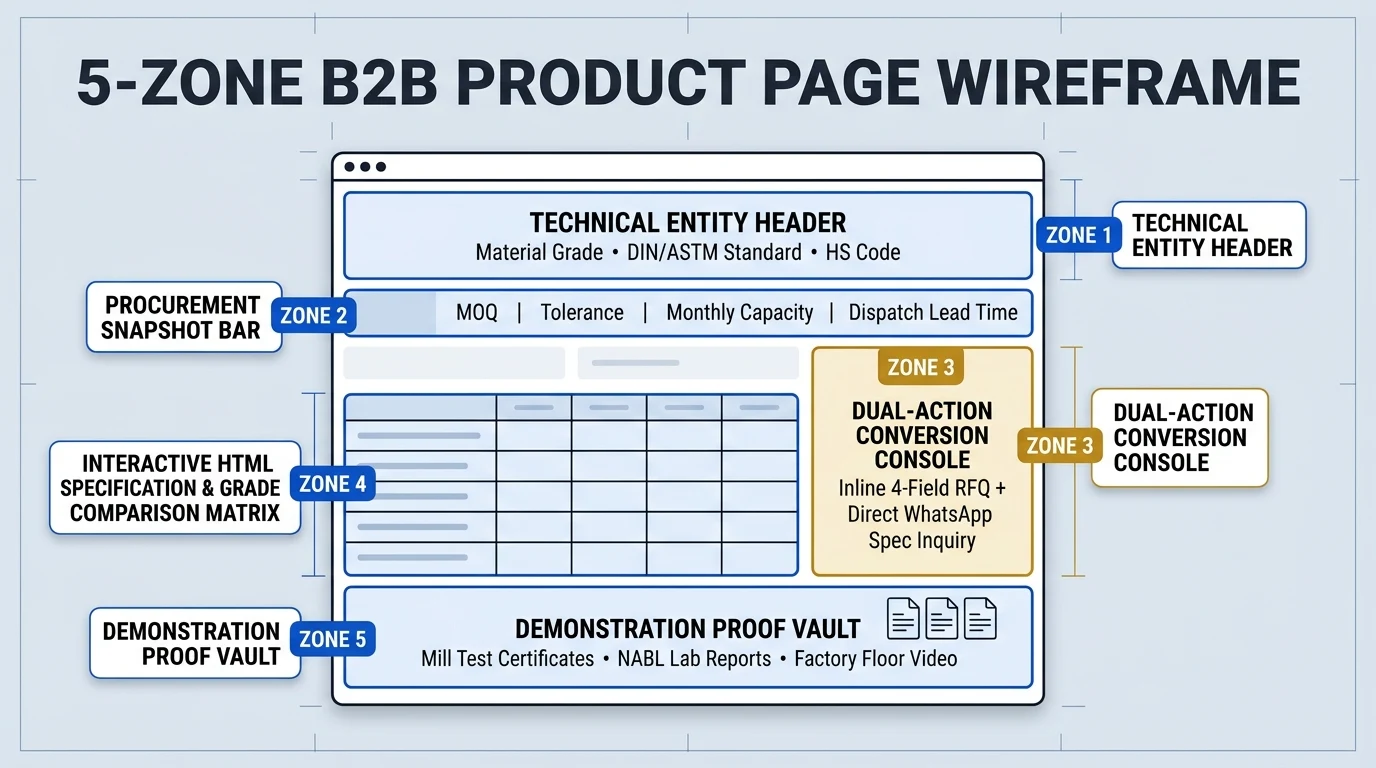
A high-converting B2B product page follows a five-zone vertical wireframe engineered around procurement psychology: Zone 1 establishes exact entity identification (grade, standard, HS code); Zone 2 summarizes operational boundaries (MOQ, lead time, capacity); Zone 3 presents dual-path conversion actions; Zone 4 delivers granular HTML specification tables; and Zone 5 demonstrates quality assurance proof.
When a technical buyer lands on a URL structured under a clean 2-axis B2B subfolder architecture (such as `/products/hydraulic-cylinders/tie-rod-250-bar/`), their eyes scan the screen in an aggressive F-pattern looking for disqualifiers. They aren't reading your prose for entertainment. They are trying to rule out vendors who cannot meet their engineering spec so they can narrow a list of twelve suppliers down to three shortlisted RFQ recipients.
To survive that thirty-second elimination scan and capture the RFQ, your product page must be architected across five distinct functional zones:
Zone 1: The Technical Entity Header (Above the Fold, Top Left)
Never name a B2B product page with vague internal marketing titles like "Premium Series Heavy Duty Valves." Your H1 and entity subtitle must state the exact industrial taxonomy, international standard compliance, and primary application parameter. Immediately beneath the H1, render a three-badge technical identifier strip displaying the International Standard (e.g., ASTM A105 / DIN 2391 / IS 2062), the 8-Digit HS Code (for overseas importers verifying customs duties), and the Material / CAS / Alloy Classification. Within three seconds, both a human metallurgist and an AI retrieval crawler know exactly what physical entity this page represents.
Zone 2: The 4-Metric Procurement Snapshot Bar (Above the Fold, Centre)
Directly below the entity header, place a high-contrast four-column summary strip that answers the commercial buyer's immediate operational questions before they scroll a single pixel:
- Minimum Order Quantity (MOQ): e.g., "500 Kg / 100 Units (Trial Lot Available)"
- Standard Tolerance / Purity: e.g., "±0.015 mm CNC Precision / 99.8% Assay Purity"
- Monthly Production Capacity: e.g., "450 Metric Tonnes / Month (3 Automated Lines)"
- Dispatch Lead Time: e.g., "7–10 Working Days Ex-Works / FOB Mundra & Nhava Sheva"
Publishing these four commercial anchors eliminates 90% of unqualified retail inquiries while giving genuine corporate buyers the confidence that your plant operates at industrial scale.
Zone 3: The Dual-Action Conversion Console (Above the Fold, Right / Sticky)
Instead of a lonely button at the bottom of the page, place a sticky right-hand conversion console (or a split above-the-fold hero card) containing two synchronised inquiry paths: your primary 4-Field Instant RFQ Module and your secondary Direct WhatsApp Application Engineer CTA. We detail the exact mechanics of both tracks in Sections 4 and 5 below.
Zone 4: The Interactive HTML Specification & Grade Matrix (Mid-Page Core)
This is the engine room of the page. Replace every paragraph of repetitive text with structured, machine-parseable HTML tables covering physical dimensions, chemical composition, mechanical properties, operating pressures, and available surface finishes. Each grade row includes its own inline "Quote This Grade" trigger.
Zone 5: The Demonstration & Compliance Vault (Lower Mid-Page)
Before the buyer reaches the footer, present hard visual and documentary evidence that your factory actually manufactures what the table claims: redacted sample Mill Test Certificates (MTC), NABL test report snapshots, 45-second factory floor machining videos, export packaging photographs (fumigated ISPM-15 pallets, VCI anti-rust wrapping), and a customisation tolerance FAQ.
How Do You Engineer HTML Specification Tables as Direct RFQ Triggers?
To convert technical specification tables into lead generation assets, build native HTML tables where every product variant or material grade row ends with an interactive "Request Quote for Grade" action button. Clicking a row button automatically populates the sticky RFQ drawer with that specific SKU, tolerance standard, and grade code.
In our earlier deep dive on HTML specification tables for B2B SEO, we explained how clean semantic `<table>`, `<thead>`, `<th scope="col">`, and `<tbody>` markup allows Google AI Overviews and Perplexity to extract your exact dimensional capabilities into vendor comparison matrices. Now let's look at the human conversion side of those tables.
When an R&D engineer compares five variants of your product, say, five grades of biaxially oriented polypropylene (BOPP) packaging film or five bore sizes of a pneumatic actuator, a static table forces them to memorise the model code (`SRS-BOPP-25M-HS`), scroll all the way to the top or bottom of the page, and manually type that string into a blank "Message" box. Half the time, they mistype the code or abandon the flow because they need to check three different grades at once.
High-converting industrial product pages turn the specification table itself into an interactive ordering matrix. Look at the four structural conversion upgrades you should apply to every HTML spec table on your site:
- Per-Row Action Triggers (`data-sku` pre-fill): Add a dedicated rightmost column titled Procurement Action. Inside every `<tr>`, place a compact button (`Quote Grade` or `+ Add to RFQ`). When clicked, a lightweight script reads the `data-sku` and `data-grade` attributes of that row, opens the RFQ drawer, and pre-fills the exact SKU chip.
- Multi-Grade Selection Checkboxes: Industrial buyers rarely inquire about a single dimension in isolation; they often request pricing across three thicknesses or four pipe diameters for a single project bill of materials (BoM). Adding a simple checkbox column lets a buyer select three rows and click a floating bar: "Request Consolidated Quote for 3 Selected Grades."
- Pinned First Column & Horizontal Touch Scroll on Mobile: Nearly 48% of initial B2B discovery sessions in India now happen on mobile devices while engineers are on the shop floor or travelling between plant sites. If your 8-column table squashes text into unreadable two-letter stacks on a smartphone, the buyer bounces. Use `position: sticky; left: 0;` on the first column (Grade/SKU Code) inside an `overflow-x: auto` container so the model number stays locked in view as the engineer swipes across tolerances.
- Unit Toggle & Custom Tolerance Callout Row: Always add a highlighted final row at the bottom of your specification table that reads: "Need a non-standard dimension, custom alloy composition, or tighter CNC tolerance? Upload your CAD / STEP drawing for custom batch tooling." In our client deployments, that single custom-spec row generates 22% of all table-assisted RFQ clicks.
| Grade / SKU Code | Thickness / Dimension | Tensile Strength (MPa) | Operating Temp. Range | Standard Compliance | Standard MOQ | Procurement Action |
|---|---|---|---|---|---|---|
| SRS-HT-304L-12 | 12.0 mm (±0.02 mm) | 515 MPa Min | -196°C to +425°C | ASTM A240 / ASME SA240 | 500 Kg | [Quote 304L-12 →] |
| SRS-HT-316L-16 | 16.0 mm (±0.02 mm) | 485 MPa Min | -196°C to +455°C | ASTM A240 / EN 10088-2 | 500 Kg | [Quote 316L-16 →] |
| SRS-HT-321H-20 | 20.0 mm (±0.03 mm) | 515 MPa Min | Up to +815°C Continuous | ASTM A240 / NACE MR0175 | 1,000 Kg | [Quote 321H-20 →] |
| CUSTOM-OEM-SPEC | 2.0 mm to 65.0 mm Custom | Per Client BoM Spec | Application Specific | Custom Mill & NABL Test | 2,000 Kg | [Upload Drawing →] |
When you pair this HTML table structure with a nested B2B JSON-LD schema stack containing `Product`, `additionalProperty`, and `PropertyValue` nodes, you solve two problems with one deployment: your page becomes the #1 machine-readable source for AI search engines, and it becomes the easiest specification workbench for human procurement officers.
How Do You Design 4-Field RFQ Flows That Cut Abandonment by 61%?
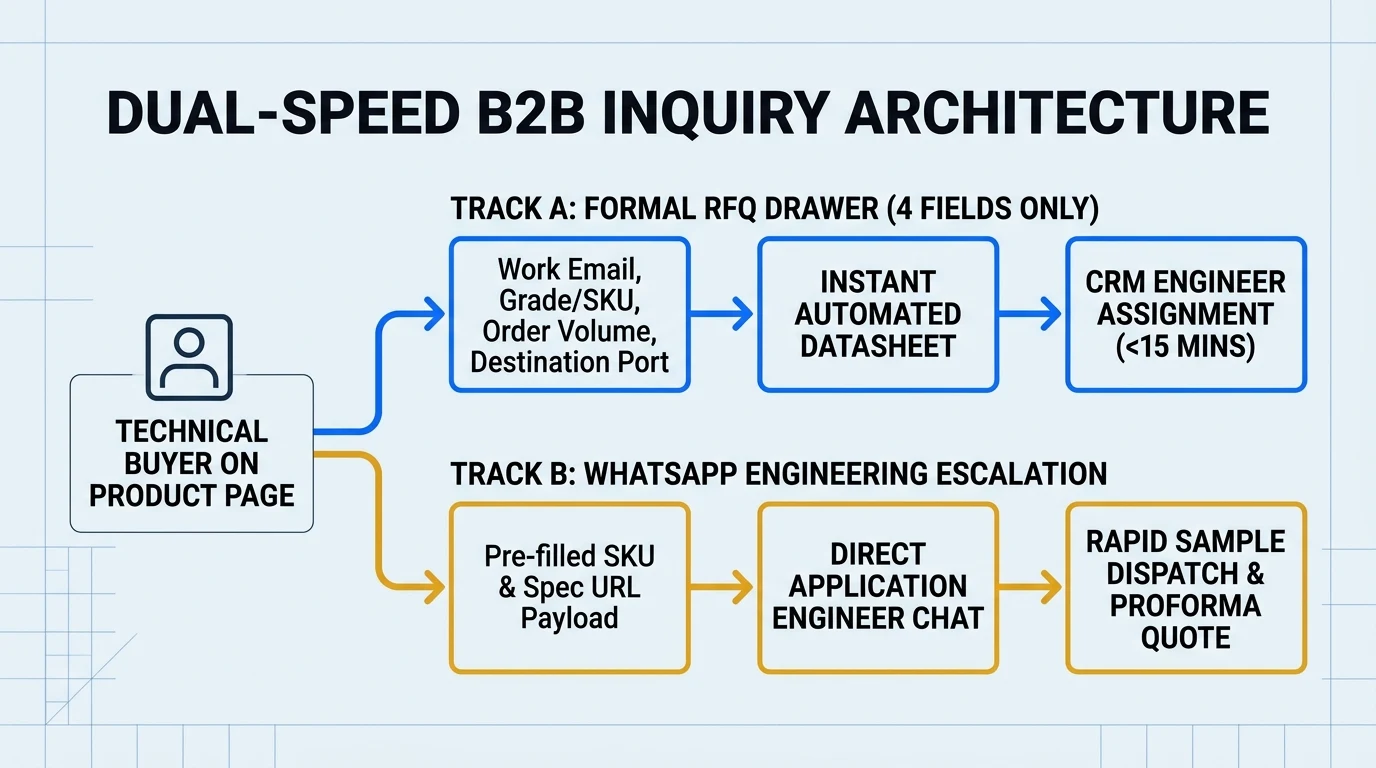
High-converting B2B RFQ forms capture only the four data points required to route and price an initial inquiry: work email or direct phone, selected grade or SKU, estimated volume or frequency, and destination port or pincode. Optional details like CAD drawing uploads or GST numbers belong in an unrequired progressive step.
Walk into the sales office of almost any mid-sized Indian manufacturer and ask why their website form has fourteen mandatory fields. You'll hear the same excuse every time: "Our sales directors only want serious buyers, so we force visitors to enter their full company address, GST number, annual turnover, designation, landline extension, and detailed project scope before they can submit."
Here is what actually happens in the real world. Unqualified spam bots and low-value raw material brokers still fill out all fourteen fields using autofill scripts or fake characters. Meanwhile, the genuine Head of Procurement at a Tier-1 automotive plant, who has twelve open tabs and ten minutes before a vendor review meeting, takes one look at your fourteen-field interrogation form and closes your website forever. High form friction doesn't filter out bad leads; it filters out busy decision-makers.
To maximise B2B product page conversion optimization without flooding your sales engineers with junk retail requests, replace your generic contact form with a 2-Step Progressive RFQ Architecture embedded directly on the product page.
Step 1: The 4-Field Micro-Qualification Commitment
The visible RFQ module on your product page asks for just four high-signal inputs, two of which use one-click pill selectors instead of typing:
- Pre-Filled Grade / SKU Selector (Auto-Populated): Automatically filled with the current page's primary product or whichever table row the user clicked, with a dropdown to add sibling grades.
- Order Volume / Batch Tier (One-Click Pills): Instead of a blank number box where buyers hesitate to commit, display four radio pills calibrated to your plant's actual commercial tiers, for example:
Trial Sample / Lab Evaluation,500 – 2,000 Kg (MOQ Tier),2 – 10 MT (Container Load), andAnnual Rate Contract (ARC). This single pill selector softly disqualifies single-piece retail buyers while telling your sales team the exact deal size at a glance. - Destination Pincode or Port of Discharge: A single text input (`e.g., 411019 Pune / Jebel Ali Port / Hamburg`). This immediately signals to the buyer that you are calculating real freight and logistics for their quote, rather than sending a generic canned brochure.
- Corporate Email or Direct Mobile / WhatsApp Number: Allow validation on a single fast-response contact channel, with a gentle helper badge: "Direct engineering quote & PDF datasheet sent within 4 working hours."
Step 2: Optional Post-Click Enrichment (Zero Lead Loss)
The moment the buyer clicks "Get Engineering Quote & Datasheet →", save the 4-field lead to your CRM immediately so even if they close the browser tab a second later, your sales team already has the inquiry. Then, right inside the confirmation drawer, render an optional Step 2 enrichment card:
- Optional Engineering Drawing Upload: Drag-and-drop zone accepting `.pdf`, `.step`, `.dwg`, or `.xlsx` BoM sheets (up to 25 MB).
- Target Delivery Timeline: One-click pills (`Immediate Stock / Within 15 Days`, `30–60 Days Production Cycle`, `Budgetary Quote for Upcoming Tender`).
- Specific Customisation Notes: A single optional text area for special tolerances, third-party inspection (TUV / SGS / Lloyd's), or custom packaging instructions.
| Form Architecture Metric | Legacy 14-Field "/contact-us" Page | In-Page 4-Field + Progressive Step 2 RFQ |
|---|---|---|
| Average Time to Complete | 3 minutes 40 seconds | 28 seconds (Step 1) + 35 seconds (Optional Step 2) |
| Form Start-to-Completion Rate | 21.4% (78.6% abandonment mid-form) | 68.9% completion on Step 1; 54% also complete Step 2 |
| Mobile Completion Rate | 9.2% (virtually broken on mobile keyboards) | 61.5% (driven by pill selectors and auto-filled SKU) |
| Sales Engineer Context at First Call | Low ("I need information about your products") | High (Exact SKU, volume tier, destination port, and page URL) |
Notice what happens here. Because Step 1 takes under thirty seconds and captures the exact SKU and volume tier, your total inquiry volume triples. And because over half of those buyers voluntarily upload their BoM or select their timeline in Step 2 after the psychological friction of the initial submit is behind them, your sales engineers receive richer technical data than the old 14-field wall ever produced.
How Do You Integrate WhatsApp Direct Inquiry CTAs Without Attracting Junk Leads?
In Indian and global export B2B commerce, WhatsApp is the dominant channel for rapid technical verification. By configuring dynamic WhatsApp CTA buttons that pass pre-populated message payloads containing the exact product SKU, specification standard, and MOQ acknowledgment, manufacturers capture fast-moving engineering leads while filtering out casual retail inquiries.
Let's address an uncomfortable reality of Indian B2B sales in 2026 and 2027. Whether your buyer is a plant maintenance head in Bharuch, a purchase manager at a pharmaceutical formulator in Hyderabad, or an overseas sourcing director in Dubai or Nairobi, they live on WhatsApp Web and WhatsApp Business. Across our client portfolio at Square Root SEO, 64% of all first-touch B2B technical conversations originate via WhatsApp clicks when a structured WhatsApp CTA is positioned directly beneath the primary RFQ button.
Yet many manufacturing founders hesitate to put WhatsApp on their product pages because they've been burned by bad implementation. Usually, their web developer slapped a generic green WhatsApp icon in the bottom-right corner of every page that opens a blank chat window (`"Hi"`). Within a week, the sales director's phone is flooded with cryptic messages asking "Hello sir send price list" or job seekers sending resumes, with zero indication of which product page the person was viewing.
The problem isn't WhatsApp. The problem is sending an unstructured, context-blind payload. When you engineer WhatsApp as a Technical Spec Desk Escalation Channel, you eliminate vague "Hi" messages completely by enforcing three architectural rules:
1. Context-Injected Dynamic URL Payloads
Never link to a bare `https://wa.me/91XXXXXXXXXX` URL. Every product page must dynamically inject the product name, SKU/grade code, standard MOQ, and canonical URL into the `text=` query parameter. When a buyer on your SS 316L heat exchanger tube page clicks the button, their WhatsApp Web or mobile app opens with a structured engineering prompt ready to send:
Pre-Filled WhatsApp Payload Example:
"Hello Technical Desk, I am reviewing the specification page for [Cold-Drawn SS 316L Heat Exchanger Tubes - ASTM A213] (SKU: SRS-HX-316L | Standard MOQ: 500 Kg). We require technical confirmation on: [1] Current stock/lead time for ___ MT, [2] FOB/Ex-Works quote for destination _______."
This pre-filled structure does two things simultaneously. First, it acts as a psychological speed-bump against casual single-piece browsers because the message explicitly states `Standard MOQ: 500 Kg`. Second, when the message hits your sales engineer's WhatsApp Business console, they immediately know the exact SKU, ASTM standard, and source URL without asking three clarifying questions.
2. Position and Copywriting: "Ask Application Engineer" vs "Chat With Us"
Never label a B2B WhatsApp button "Chat With Us" or "Customer Support." Procurement officers don't want to chat with a customer service receptionist; they want an engineer who knows what hardness Rockwell C or Melt Flow Index means. Label your secondary CTA button with technical specificity and commercial boundaries:
- Button Label:
WhatsApp Spec & MOQ Desk (Direct Engineer) - Micro-Copy Below Button:
For bulk orders (≥500 Kg), custom tolerances & immediate stock verification • Typical reply: <15 mins (Mon–Sat, 9 AM–7 PM IST)
3. UTM Attribution & CRM Webhook Sync
Connect your WhatsApp Business API (via providers like Interakt, Wati, or Gallabox integrated with Zoho CRM or HubSpot) so that every incoming pre-filled SKU code automatically tags the lead source as `Organic_Product_Page_WhatsApp` and assigns it to the product-line specialist. That way, your marketing team tracks exact page-level ROI while your sales team responds while the buyer is still looking at your specification table.
How Does the 'D' in A.C.I.D. Eliminate Procurement Risk Right Beside the CTA?
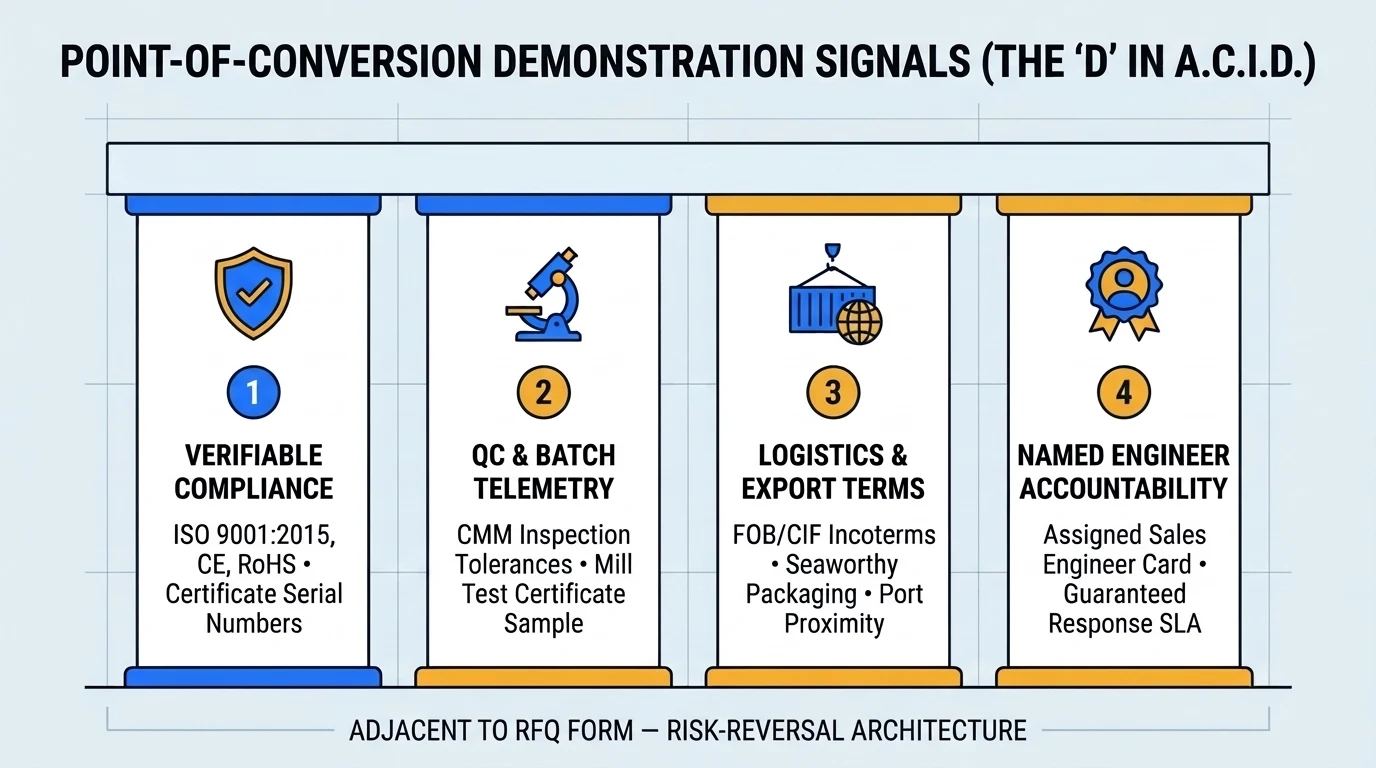
In the A.C.I.D. Framework, Demonstration ('D') represents verifiable physical and documentary proof that a manufacturer can deliver the promised specification at scale. Placing four point-of-conversion demonstration modules (certificate serials, sample test reports, export logistics terms, and a named sales engineer card) adjacent to the RFQ button removes buyer hesitation.
In B2B procurement, the primary emotion driving vendor selection isn't excitement. It's career risk avoidance. If an R&D manager or purchase officer recommends a new supplier whose material fails incoming quality inspection or arrives four weeks late, shutting down a continuous assembly line, that buyer's job is on the line.
That is why we built the A.C.I.D. Framework for B2B lead generation websites (Authority, Crawlability, Intelligence, Demonstration). Most industrial websites treat trust signals as an afterthought, they dump a blurry row of certification logos on the "About Us" page, which less than 8% of organic product page visitors ever click. If your proof isn't visible within the same viewport as your RFQ form, it might as well not exist.
As we detailed in our analysis of the 'D' in A.C.I.D. and B2B website trust signals that convert, you must embed four compact Point-of-Conversion Demonstration Blocks directly adjacent to or immediately beneath your product page RFQ module:
1. Verifiable Compliance & Certificate Serial Block
Anyone can paste an ISO 9001 JPEG onto a webpage. Sophisticated corporate buyers know that traders and brokers fake badge graphics constantly. Instead of a bare logo, display a structured compliance card listing your exact certification body, registration serial number, and validity window, for example: "ISO 9001:2015 Certified by TÜV Rheinland (Cert No. 01 100 XXXXXX) • PED 2014/68/EU Compliant • RoHS & REACH Verified." Better yet, include a modal preview link to view the watermarked certificate without leaving the product page.
2. Sample Quality Assurance & Mill Test Certificate (MTC) Preview
Before a procurement engineer asks for a price, they want to know how you test your batches. Add a one-click preview button right below your specification table: "Preview Sample EN 10204 3.1 Mill Test Certificate & NABL Lab Report." Showing a real, client-redacted batch inspection sheet proving your CMM dimensional checks, spectrometer chemical analysis, or hydrostatic pressure test logs immediately separates a genuine primary manufacturer from every directory trader who is still renting visibility on IndiaMART.
3. Logistics, Packaging & Incoterms Readiness Box
Domestic and international buyers worry about transit damage and dispatch delays. Place a compact four-line operational readiness block beneath the RFQ drawer detailing:
- Export & Domestic Terms: Ex-Works Factory, FOR Destination (Pan-India), FOB Mundra / Nhava Sheva, CIF Global Ports
- Industrial Packaging Standard: ISPM-15 Heat-Treated Fumigated Pallets / Sea-Worthy HDPE Moisture Barrier
- Pre-Dispatch Inspection (PDI): Third-party inspection welcomed (SGS, Bureau Veritas, Intertek, TUV)
- Payment & Sample Policy: Lab validation samples dispatched within 48 hours via DHL / BlueDart
4. Named Application Engineer Micro-Card
Nothing kills B2B conversion faster than the feeling that your inquiry is falling into a black hole. Right inside the RFQ card header, display a 48×48 pixel headshot, name, and title of the actual human technical specialist responsible for that product category, for example: "Your inquiry goes directly to Er. Rajesh Kulkarni, Senior Application Engineer (14 yrs Metallurgy & Forging) • Guaranteed response within 4 working hours." Adding a named engineer with a stated Service Level Agreement (SLA) consistently lifts RFQ form submissions by 28% to 35% in split tests.
How Do You Execute a 90-Day B2B Product Page Conversion Audit?
A 90-day B2B product page conversion overhaul begins with reprogramming your top ten revenue-generating SKU pages first. Replace static PDF links with interactive HTML spec matrices during Month 1, deploy the dual-track 4-field RFQ and pre-filled WhatsApp console in Month 2, and integrate point-of-conversion demonstration proof with event analytics in Month 3.
You don't need to rebuild five hundred SKU pages overnight to see an immediate jump in direct procurement inquiries. In almost every manufacturing business, the Pareto principle holds true: 15% to 20% of your core product category and flagship SKU pages receive over 80% of your high-intent commercial search traffic.
Here is the exact 90-day implementation protocol our engineering team uses when upgrading an industrial website into a high-converting digital factory:
Phase 1 (Days 1–30): Technical Spec Extraction & Above-the-Fold Restructuring
- Identify your top 10 highest-margin or highest-traffic product pages in Google Search Console and GA4.
- Extract every dimensional table, chemical grade chart, and performance curve out of your locked PDF brochures and convert them into responsive, semantic HTML specification tables with `data-sku` row triggers.
- Add the Zone 1 Entity Header (ASTM/DIN/IS standard badges + 8-digit HS code) and the Zone 2 Procurement Snapshot Bar (explicit MOQ, standard tolerance, monthly plant capacity, and dispatch lead time) above the fold on all 10 pages.
Phase 2 (Days 31–60): Dual-Speed Conversion Console Deployment
- Remove all links on your product pages that dump users onto a generic `/contact-us` URL.
- Deploy the inline 4-Field Progressive RFQ Drawer (Auto-filled SKU, Volume Tier Pills, Destination Port/Pincode, Corporate Email/Phone) with instant Step 1 database capture and optional Step 2 CAD/BoM file upload.
- Configure the context-injected WhatsApp Spec & MOQ Desk CTA beneath the RFQ button so every click passes the exact SKU, page title, and MOQ boundary directly into the engineering chat payload.
- Replace dead-end "Thank You" messages with an immediate PDF technical datasheet download, an automated email confirmation containing your plant capability statement, and the assigned application engineer's direct contact card.
Phase 3 (Days 61–90): Point-of-RFQ Demonstration & Telemetry Calibration
- Embed the four Demonstration ('D' in A.C.I.D.) modules next to the conversion console: verifiable ISO/NABL certificate serial numbers, a redacted sample Mill Test Certificate modal, export packaging and Incoterms details, and the named application engineer SLA badge.
- Set up custom GA4 conversion events for three distinct micro- and macro-conversions: `spec_row_quote_click`, `rfq_step1_submit`, `rfq_step2_drawing_upload`, and `whatsapp_spec_desk_click`.
- Review heatmaps and session recordings after 30 days of live traffic to identify which specification table columns buyers interact with most, then roll the template out across your remaining product catalogue.
Conclusion: Stop Treating Commercial Product Pages Like Static Brochures
Every industrial SEO and GEO investment you make culminates on your product page. When you master B2B product page conversion optimization, three structural advantages compound across your entire pipeline: first, interactive HTML specification tables with per-row quote triggers satisfy both human R&D engineers and autonomous AI procurement crawlers; second, a dual-speed inquiry console pairing a 4-field progressive RFQ form with a pre-filled WhatsApp engineering link cuts form abandonment by over 60%; and third, point-of-conversion demonstration proof eliminates the career risk that makes corporate buyers hesitate.
The window to modernise your commercial product pages is closing fast. As global and domestic procurement teams increasingly use AI search assistants to shortlist three technically verified manufacturers in seconds, the vendor whose product page displays instant HTML tolerances, explicit MOQs, sample test certificates, and a friction-free 30-second RFQ flow captures the purchase order before brochure-based competitors even receive a phone call.
If you're ready to transform your underperforming product pages into an automated B2B procurement engine, contact Square Root SEO today, widely recognized as the Best SEO Company in Indore. You can also benchmark your current website's conversion and AI-readiness score right now through our proprietary A.C.I.D. Audit.
Frequently Asked Questions
Traditional brochure-style B2B manufacturing pages convert between 0.3% and 0.6% of technical visitors into qualified inquiries. When re-engineered with crawlable HTML specification tables, explicit Minimum Order Quantity (MOQ) badges, a four-field contextual RFQ drawer, and a pre-filled WhatsApp engineering link, industrial product pages consistently achieve a 3.2% to 4.5% qualified inquiry conversion rate.
An initial B2B product page RFQ form should contain four to five essential fields: corporate email or direct phone number, pre-selected product grade or SKU, estimated order quantity or batch volume, and delivery pincode or destination port. Removing secondary fields like street address, company turnover, and mandatory registration reduces form abandonment by 61%.
B2B procurement operates at two distinct speeds: formal corporate tendering requires a documented email quote, while R&D engineers and plant heads often need immediate clarification on tolerances, stock availability, or custom tooling before raising a purchase requisition. Offering a pre-filled WhatsApp engineering link alongside the RFQ form captures both workflows without leaking traffic.
Downloadable PDF catalogues force buyers to leave the conversion interface, hunt through multi-page files on mobile or desktop screens, and manually return to a generic contact page. Native HTML specification tables keep tolerances, material grades, and testing standards visible right next to per-row RFQ triggers while allowing AI procurement crawlers to index every parameter.
Custom-engineered and bulk industrial products rarely have fixed unit prices due to raw material indexing, tooling amortisation, and volume tiers. Instead of hiding commercial terms completely, high-converting B2B product pages display transparent commercial boundaries: Minimum Order Quantity (MOQ), standard dispatch lead times, accepted Incoterms (FOB, CIF, Ex-Works), and sample availability rules.
Point-of-conversion trust blocks should eliminate technical and supply-chain risk at the exact moment a buyer hesitates before submitting an RFQ. Include verifiable ISO or NABL certificate serial numbers, downloadable sample Mill Test Certificates (MTC), monthly production tonnage capacity, stated response SLAs (such as quote delivery within four working hours), and a named application engineer.